VS Code Markdown PDF Extension: Tips and Gotchas
Practical tips for using the Markdown PDF extension in VS Code, including common pitfalls with Mermaid diagrams.
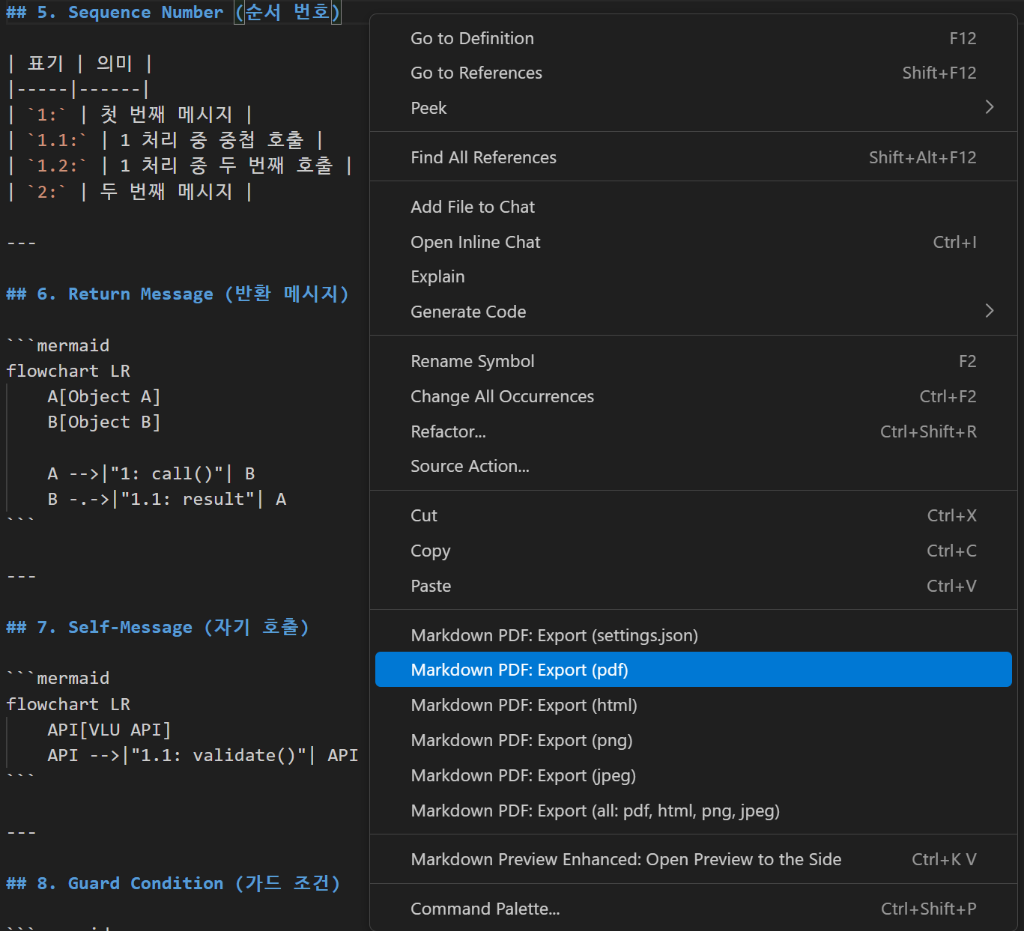
Introduction
I spent 2 hours debugging a Mermaid diagram that worked perfectly in VS Code’s preview but crashed during PDF export. The error message was just “Syntax error in text” with no line number. After multiple trial-and-error sessions, I compiled this list of gotchas that I wish I knew earlier.
The Three Common Traps
Before diving into details, here’s what causes 90% of PDF export failures:
| Trap | Problem | Solution |
|---|---|---|
| Reserved Keywords | AND, OR break the parser | Use _AND_, _OR_ |
| Angle Brackets | <row> looks like HTML | Use <해당row> (add non-English) |
| Real HTML Tags | <meta>, <div> always fail | Use <메타>, <구역> |
Trap #1: Reserved Keywords
Mermaid uses AND, OR as logical operators internally. Using them in labels can cause parsing issues.
flowchart LR
    subgraph "Error"
        A1[A] -->|"AND"| B1[B]
    end
    subgraph "Works"
        A2[A] -->|"_AND_"| B2[B]
    end
Affected Keywords
| Keyword | Status | Alternative |
|---|---|---|
AND | Error | _AND_ |
OR | Error | _OR_ |
NOT | Usually OK | _NOT_ (safer) |
IN | Usually OK | _IN_ (safer) |
Trap #2: Angle Brackets = HTML?
The PDF exporter uses Puppeteer (headless Chrome). Content in angle brackets can be interpreted as HTML tags.
Which Brackets Fail?
| Content | Result | Why |
|---|---|---|
<row> | Error | Looks like HTML tag |
<unchanged> | Error | Looks like HTML tag |
<1개> | Works | Number makes it invalid HTML |
<해당row> | Works | Korean makes it invalid HTML |
Fix: Add Non-English Characters
1
2
3
4
5
Before (Error):
A -.->|"200(rows=<row>)"| T

After (Works):
A -.->|"200(rows=<해당row>)"| T
Trap #3: Real HTML Tag Names
If your placeholder happens to be a real HTML tag name, it will always fail:
| Tag | Problem | Alternative |
|---|---|---|
<meta> | Real HTML tag | <메타> or META |
<div> | Real HTML tag | <구역> or DIV |
<span> | Real HTML tag | <범위> or SPAN |
<br> | Real HTML tag | Remove or use / |
Quick Fix Checklist
Before exporting to PDF, search for these patterns:
flowchart TD
    Q1{Export Failed?}
    Q1 -->|Yes| C1["Search: AND, OR"]
    C1 --> F1["Replace with _AND_, _OR_"]

    F1 --> C2["Search: \u003cEnglish-only\u003e"]
    C2 --> F2["Add Korean: \u003c한글\u003e"]

    F2 --> C3["Search: \u003cmeta\u003e, \u003cdiv\u003e, \u003cspan\u003e"]
    C3 --> F3["Replace: \u003c메타\u003e, \u003c구역\u003e"]

    F3 --> Q2{Still Failing?}
    Q2 -->|Yes| A1["Export incrementally to find the problematic section"]
    Q2 -->|No| A2["Success!"]
Configuration Tips
Fix Korean Text Rendering
If Korean appears as boxes:
1
2
3
4
5
{
  "markdown-pdf.styles": [
    "https://fonts.googleapis.com/css2?family=Noto+Sans+KR&display=swap"
  ]
}
Page Layout Settings
1
2
3
4
5
6
7
{
  "markdown-pdf.format": "A4",
  "markdown-pdf.margin.top": "20mm",
  "markdown-pdf.margin.bottom": "20mm",
  "markdown-pdf.margin.left": "15mm",
  "markdown-pdf.margin.right": "15mm"
}
Workflow: Avoiding Export Pain
flowchart LR
    W[Write section] --> P[Preview in VS Code]
    P --> E[Export to PDF]
    E --> Q{Success?}
    Q -->|Yes| W
    Q -->|No| D[Debug with checklist]
    D --> W
Key: Export after every few sections, not at the end. Finding the problematic line in a 200-line document is painful.
Summary
| Problem | Quick Fix |
|---|---|
AND/OR errors | _AND_/_OR_ |
<english> fails | <한글> |
<meta> fails | <메타> or META |
| Korean is broken | Add Noto Sans KR font |
| Export is slow | Split into smaller files |
The extension is powerful once you know the workarounds. Most issues come from Mermaid diagrams - fix those first!