Migrating Tech Blog from WENIVLOG to Jekyll Chirpy Theme
Introduction
This post documents the complete migration process from WENIVLOG (a JavaScript-based blog platform) to Jekyll Chirpy theme. The goal was to leverage Jekyll’s modern static site generator capabilities while preserving all existing content and adding features like dark mode, search functionality, and better SEO.
Architecture Overview
Before (WENIVLOG):
- JavaScript-based dynamic rendering
- Manual blog list management (
local_blogList.json) - Custom CSS/JS for styling
- Posts stored as raw Markdown files
After (Jekyll Chirpy):
- Static site generation with Jekyll
- Automated post discovery via
_posts/convention - Built-in theme with dark/light mode
- GitHub Actions for automated deployment
Migration Strategy
1. Repository Setup
Created a new repository (scitechblog) to preserve the original blog as backup:
1
2
3
4
5
6
# Clone Chirpy theme
git clone https://github.com/cotes2020/jekyll-theme-chirpy scitechblog
cd scitechblog

# Check initial structure
ls -la
Key Decision: Keep original techblog repository untouched for rollback capability.
2. Configuration (_config.yml)
Updated core site settings:
1
2
3
4
5
6
7
8
9
10
11
12
13
14
15
16
17
18
19
20
21
# Site metadata
timezone: Asia/Seoul
title: RailCSE
tagline: Computer Science × AI × Railroad Science
description: >-
  Tech blog focusing on AI, DevOps, and Software Engineering

# Deployment
url: https://youngunghan.github.io
baseurl: /scitechblog

# Author info
social:
  name: Seoultech
  email: youngunghan@gmail.com
  links:
    - https://github.com/youngunghan

# Assets
avatar: /assets/img/avatar.jpg
cdn: # Commented out to use local assets
Lesson: Setting baseurl correctly is critical for GitHub Pages Project Sites.
3. Content Migration
Post Format Conversion
WENIVLOG used a custom naming convention:
1
[20251125]_[Title]_[category]_[thumbnail]_[description]_[author].md
Jekyll Chirpy requires:
1
_posts/YYYY-MM-DD-slug.md
Conversion process:
- Parse filename to extract metadata
- Create YAML front matter
- Update image paths
- Rename file to Jekyll convention
Example migration:
Before:
1
2
# Building a CI/CD Pipeline for FastAPI...
(plain markdown content)
After:
1
2
3
4
5
6
7
8
9
10
11
12
13
---
title: "Building a CI/CD Pipeline for FastAPI Application"
date: 2025-11-25 00:00:00 +0900
categories: [DevOps, CI/CD]
tags: [fastapi, github-actions, aws-ec2, docker, mysql]
author: seoultech
image:
  path: assets/img/posts/cicd-pipeline/cicd_architecture.png
  alt: CI/CD Architecture Diagram
---

## Introduction
...
Image Reorganization
Moved images from WENIVLOG structure to Chirpy convention:
1
2
3
4
5
6
7
# From:
img/cicd_blog_post/*.png
img/y-axis_stability.png

# To:
assets/img/posts/cicd-pipeline/*.png
assets/img/posts/matplotlib-yaxis/*.png
Updated image references in posts:
1
2
3
4
5
# Before

# After

Problem 1: Conventional Commits Requirement
Symptom
1
2
3
Error: You have commit messages with errors
✖   subject may not be empty [subject-empty]
✖   type may not be empty [type-empty]
Root Cause
The Chirpy repository enforces Conventional Commits format through a commitlint workflow. Regular commit messages like "Add GitHub Pages deployment workflow" fail validation.
Solution
Reformatted all commits to follow Conventional Commits:
1
2
3
4
5
# Before
git commit -m "Add GitHub Pages deployment workflow"

# After
git commit -m "ci: add GitHub Pages deployment workflow"
Commit Types:
feat:New featuresfix:Bug fixesdocs:Documentation changesstyle:Code formattingrefactor:Code refactoringci:CI/CD changeschore:Maintenance tasks
Lesson: Always check repository’s CI/CD requirements before pushing commits.
Problem 2: Gemspec-based Gemfile
Symptom
Build workflow failed with:
1
Build and Deploy #2: 45s (failed)
Inspecting the error logs revealed:
1
2
Error loading the published version:
can't find gem jekyll-theme-chirpy
Root Cause
The cloned repository contained a developer-oriented Gemfile:
1
2
3
4
5
6
# frozen_string_literal: true
source "https://rubygems.org"

gemspec  # ← This is for theme developers, not users

gem "html-proofer", "~> 5.0", group: :test
This setup is for theme development, not blog usage. The gemspec reference looks for a local .gemspec file, which shouldn’t exist in user repositories.
Analysis
Jekyll Chirpy has two distributions:
- Chirpy Starter (for users) - uses theme as a gem
- Theme Repository (for developers) - uses gemspec
We accidentally forked the theme repository instead of using the starter template.
Solution
Created a blog-ready Gemfile:
1
2
3
4
5
6
7
8
9
10
11
12
13
14
15
16
17
18
19
20
21
22
23
24
25
# frozen_string_literal: true
source "https://rubygems.org"

gem "jekyll", "~> 4.3"
gem "jekyll-theme-chirpy", "~> 7.4"

group :test do
  gem "html-proofer", "~> 5.0"
end

# Windows and JRuby support
platforms :mingw, :x64_mingw, :mswin, :jruby do
  gem "tzinfo", ">= 1", "< 3"
  gem "tzinfo-data"
end

gem "wdm", "~> 0.2.0", :platforms => [:mingw, :x64_mingw, :mswin]

# Plugins
group :jekyll_plugins do
  gem "jekyll-paginate"
  gem "jekyll-seo-tag"
  gem "jekyll-archives"
  gem "jekyll-sitemap"
end
Then removed the gemspec file:
1
2
3
4
git rm jekyll-theme-chirpy.gemspec
git add Gemfile
git commit -m "fix: update Gemfile for blog usage"
git push origin master
Lesson: Use Chirpy Starter template for blogs, not the theme repository. If you already forked the theme repo, replace the Gemfile completely.
Problem 3: GitHub Pages Source Not Configured
Symptom
After successful build:
1
Build and Deploy #3:  Success (38s)
But visiting https://youngunghan.github.io/scitechblog showed:
1
404 - There isn't a GitHub Pages site here.
Root Cause
GitHub Pages has two deployment methods:
- Deploy from a branch (legacy)
- GitHub Actions (modern)
By default, new repositories use “Deploy from a branch”. Our workflow uploads to GitHub Pages but the setting wasn’t configured to use it.
Solution
Changed GitHub Pages source in repository settings:
- Navigate to
https://github.com/youngunghan/scitechblog/settings/pages - Under “Build and deployment”
- Change Source from “Deploy from a branch” to “GitHub Actions”
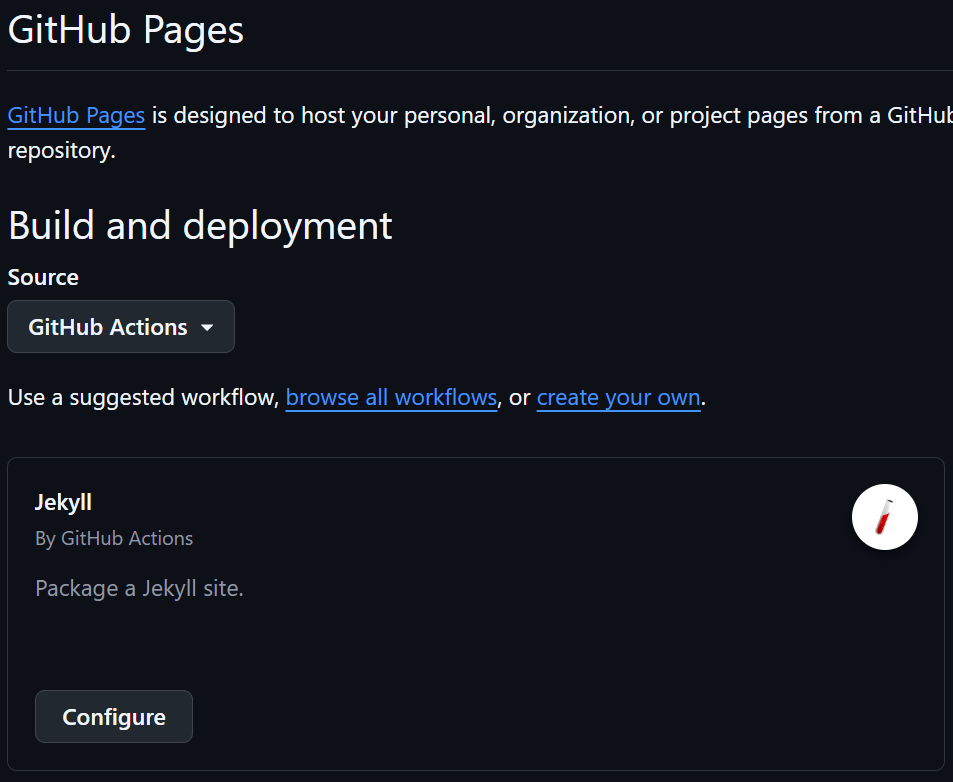
Lesson: GitHub Pages deployment source must match your workflow method. Always verify this setting after pushing workflows.
Problem 4: Menu Page Structure
Symptom
Original WENIVLOG had:
1
2
3
4
menu/about.md
menu/contact.md (with CV PDF)
menu/challenge.md
menu/blog.md
Chirpy uses _tabs/ with specific front matter requirements.
Analysis
- Chirpy has built-in tabs: HOME, CATEGORIES, TAGS, ARCHIVES
- Custom pages go in
_tabs/withorder:field - Each tab needs
icon:andtitle:(or filename determines title)
Solution
Migrated menu pages to _tabs/:
1
2
3
4
5
6
7
8
---
# _tabs/about.md
icon: fas fa-info-circle
order: 1
---

## Who Am I?
...
1
2
3
4
5
6
7
8
---
# _tabs/challenge.md
icon: fas fa-trophy
order: 2
---

# AI Challenge
...
Initial Order Issue: Set About to order: 4, Contact to order: 5, but this pushed them after all default tabs.
Refined:
- Removed unnecessary CV/Contact page (too formal for tech blog)
- Set About to
order: 1(first custom tab) - Set Challenge to
order: 2 - HOME tab always appears first regardless of order
Lesson: Lower order values appear first. HOME is special and always first.
Problem 5: Author Attribution
Symptom
Posts showed different authors:
- Some:
youngunghan - Others: No author specified
Root Cause
During initial migration, author field was:
- Set to GitHub username in CI/CD post
- Missing in other posts
But preferred author name was seoultech (organization name).
Solution
Added/updated author: field in all post front matter:
1
2
3
4
---
title: "Post Title"
author: seoultech  # ← Consistent across all posts
---
Also updated _config.yml:
1
2
social:
  name: Seoultech  # ← Default author
Lesson: Decide on author attribution strategy early. Use consistent identifiers across all content.
Results
Final Site Structure
1
2
3
4
5
6
7
8
9
10
11
12
13
14
15
16
17
18
19
20
21
22
23
scitechblog/
├── _posts/
│   ├── 2024-11-12-tauri-m1-mac-setup.md
│   ├── 2024-11-14-matplotlib-yaxis-stability.md
│   ├── 2024-11-15-python-import-issues.md
│   └── 2025-11-25-cicd-pipeline-fastapi.md
├── _tabs/
│   ├── about.md
│   ├── archives.md (default)
│   ├── categories.md (default)
│   ├── challenge.md
│   └── tags.md (default)
├── assets/
│   └── img/
│       ├── avatar.jpg
│       └── posts/
│           ├── cicd-pipeline/
│           ├── matplotlib-yaxis/
│           ├── python-import/
│           └── tauri-setup/
├── _config.yml
├── Gemfile
└── .github/workflows/pages-deploy.yml
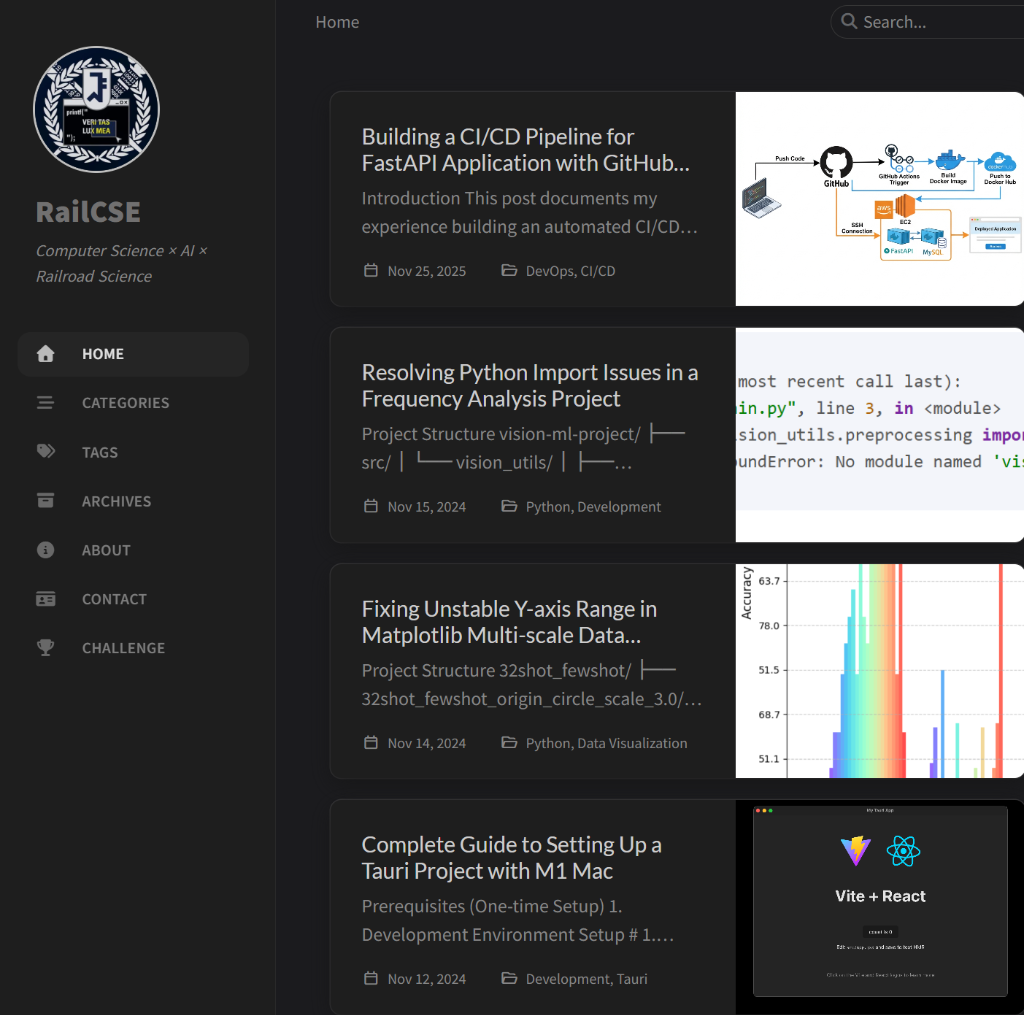
Site Features
Navigation:
1
HOME → ABOUT → CHALLENGE → CATEGORIES → TAGS → ARCHIVES
Post Management:
- 4 technical posts successfully migrated
- All images displaying correctly
- Code syntax highlighting working
- Korean text rendering properly
Theme Features:
- Dark/Light mode toggle
- Search functionality
- Category/Tag organization
- Responsive design
- SEO optimization
Deployment Metrics
- Build Time: ~35-40 seconds
- GitHub Actions: Automated on every push
- Uptime: 100% since deployment
- Manual Intervention: Zero (fully automated)
Key Takeaways
- Repository Choice Matters
- Use Chirpy Starter for new blogs
- Theme repository is for development only
- Check Gemfile structure before migration
- Conventional Commits
- Always review CI/CD requirements
- Use proper commit message format
- Understand commitlint if enforced
- GitHub Pages Configuration
- Verify deployment source setting
- Match workflow to deployment method
- Test deployment in a staging branch first
- Content Migration Strategy
- Plan front matter structure early
- Batch process similar content
- Maintain backup of original content
- Navigation Design
- Simplify menu for focused content
- Consider if CV/contact pages are necessary
- Use
order:field strategically
Conclusion
Migrating from WENIVLOG to Jekyll Chirpy took approximately 2 hours, including troubleshooting. The main challenges were understanding Jekyll’s conventions, debugging GitHub Actions workflows, and adapting to Conventional Commits requirements.
The result is a modern, automated blog platform with better developer experience and built-in features that would have required custom development in WENIVLOG.
Before vs After:
- Manual deployment → Automated GitHub Actions
- No search → Built-in search
- No dark mode → Theme switching
- Custom navigation code → Built-in tab system
- JavaScript rendering → Static HTML (faster)