Building a Secure HTTPS CI/CD Pipeline for FastAPI on AWS EC2
Introduction
In this post, I’ll share my journey of deploying a FastAPI application to AWS EC2 with full HTTPS support. This was part of a seminar assignment where the goal was to integrate a MySQL RDS database, automate deployment using GitHub Actions, and secure the server using Nginx and Certbot.
The journey wasn’t smooth—I encountered rate limits, missing configurations, and environment variable hell. Here is how I solved them.
Architecture Overview
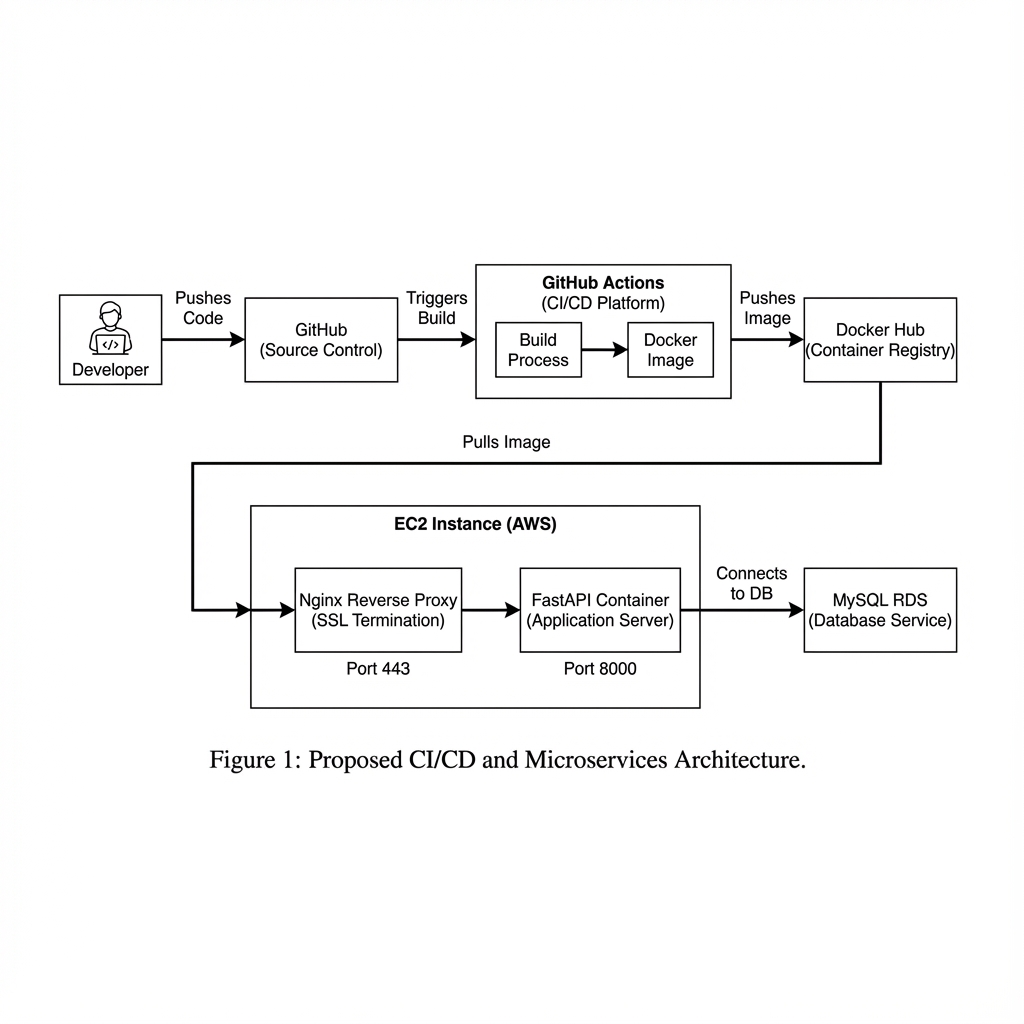
The system follows a standard CI/CD and containerized deployment pattern:
The architecture consists of:
- FastAPI: The backend application.
- MySQL RDS: Managed database service on AWS.
- Nginx: Reverse proxy to handle SSL termination and forward traffic to FastAPI.
- Certbot: Automates Let’s Encrypt SSL certificate issuance and renewal.
- Docker Compose: Orchestrates the application, Nginx, and Certbot containers.
- GitHub Actions: CI/CD pipeline to build and deploy on every push to
main.
Implementation
Docker Compose Configuration
We use docker-compose.yaml to define our services. A key part is setting up Nginx and Certbot to share volumes for the ACME challenge.
1
2
3
4
5
6
7
8
9
10
11
12
13
14
15
16
17
18
19
20
21
22
23
services:
  wapang:
    image: ${DOCKER_HUB_USERNAME}/wapang:latest
    env_file: .env
    # ... (omitted for brevity)

  nginx:
    image: nginx:1.25
    ports:
      - "80:80"
      - "443:443"
    volumes:
      - ./nginx/nginx.conf:/etc/nginx/nginx.conf:ro
      - ./data/certbot/conf:/etc/letsencrypt
      - ./data/certbot/www:/var/www/certbot
    depends_on:
      - wapang

  certbot:
    image: certbot/certbot
    volumes:
      - ./data/certbot/conf:/etc/letsencrypt
      - ./data/certbot/www:/var/www/certbot
HTTPS & Certbot Workflow
To automate SSL certificate issuance and renewal, we set up a shared volume between Nginx and Certbot.
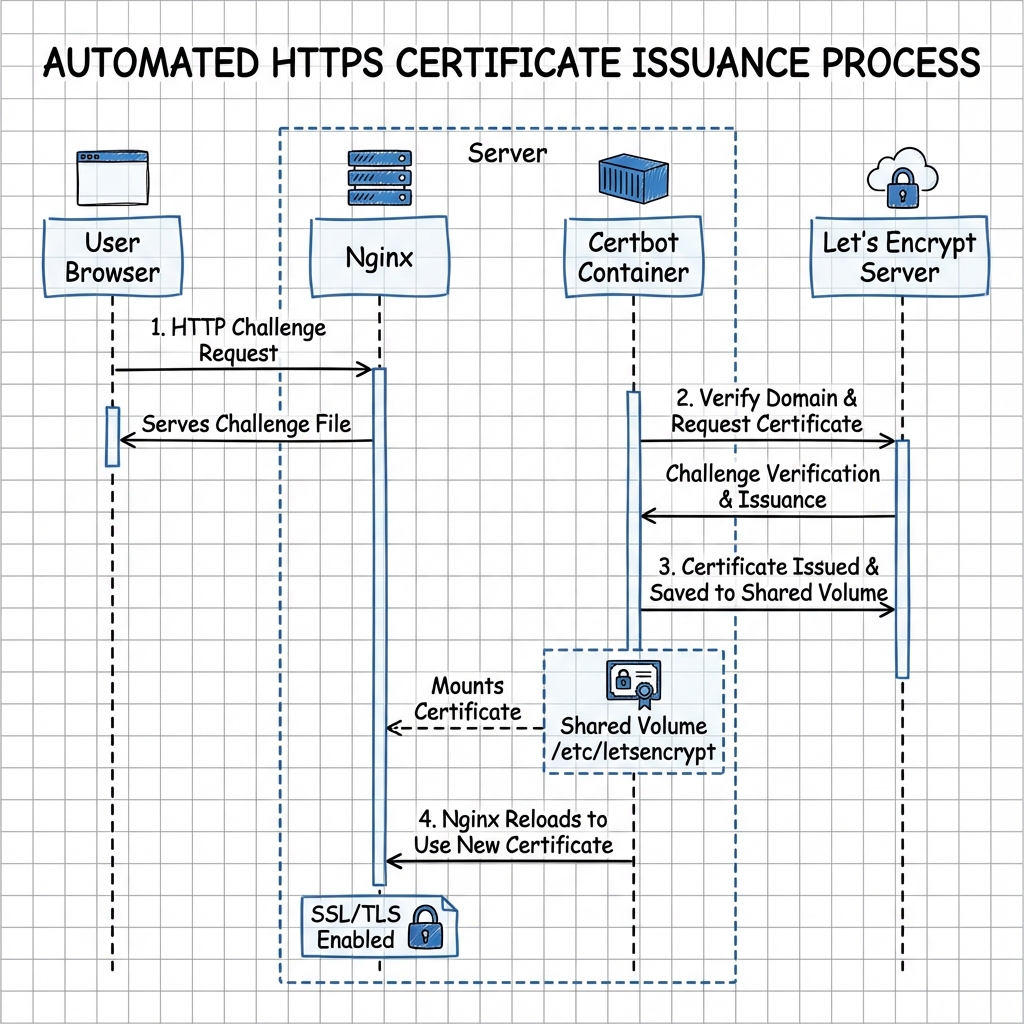
- Nginx serves the
.well-known/acme-challengedirectory. - Certbot places a challenge file in that directory.
- Let’s Encrypt verifies the file via HTTP.
- Upon success, certificates are saved to the shared
/etc/letsencryptvolume.resting.
GitHub Actions Workflow
The CD pipeline (cd.yml) handles:
- Building the Docker image.
- Pushing to Docker Hub.
- SSHing into EC2.
- Creating
.envfrom GitHub Secrets. - Running
docker-compose up -d.
Troubleshooting
This is where things got interesting.
Problem 1: Let’s Encrypt Rate Limit
Symptom
The deployment failed with the following error from Certbot:
1
2
An unexpected error occurred:
Error: too many certificates (5) already issued for this exact set of identifiers
Root Cause
I had triggered the deployment pipeline too many times while debugging other issues. Each failure attempted to issue a new certificate, eventually hitting Let’s Encrypt’s rate limit of 5 certificates per week for the same domain.
Solution
Since I couldn’t wait a week, the only solution was to change the domain. I created a new DuckDNS domain (youngunghan-wapang-2.duckdns.org) and updated the DOMAIN_NAME secret in GitHub.
Problem 2: Nginx Crash (Missing Config)
Symptom
After changing the domain, Nginx refused to start, causing ERR_CONNECTION_REFUSED.
Root Cause
The nginx/nginx.conf file was accidentally deleted from the repository or not properly copied to the server. Without the configuration file, Nginx couldn’t start.
Solution
I restored the nginx/nginx.conf file and pushed it to the repository.
Problem 3: Database Connection Failure (502 Bad Gateway)
Symptom
Nginx started, but accessing the site returned 502 Bad Gateway. Checking the logs (docker logs wapang) revealed:
1
2
3
4
pydantic_core._pydantic_core.ValidationError: 3 validation errors for DatabaseSettings
dialect (missing)
driver (missing)
database (missing)
Root Cause
The wapang container was missing critical environment variables (DB_DIALECT, DB_DRIVER, DB_DATABASE). I had defined them in .env but failed to pass them correctly in docker-compose.yaml.
Solution
I updated docker-compose.yaml to explicitly pass these variables:
1
2
3
4
environment:
  - DB_DIALECT=${DB_DIALECT}
  - DB_DRIVER=${DB_DRIVER}
  - DB_DATABASE=${DB_NAME}
Problem 4: Auth Secrets Missing
Symptom
The application crashed again with:
1
2
3
pydantic_core._pydantic_core.ValidationError: 2 validation errors for AuthSettings
ACCESS_TOKEN_SECRET (missing)
REFRESH_TOKEN_SECRET (missing)
Root Cause
Similar to the database issue, the JWT signing secrets were missing from the environment configuration.
Solution
I added ACCESS_TOKEN_SECRET and REFRESH_TOKEN_SECRET to GitHub Secrets and updated both the CD pipeline (to write them to .env) and docker-compose.yaml (to pass them to the container).
Verification
To verify everything was working, I wrote a Python script to register a user via the public HTTPS API.
1
2
3
4
5
6
7
8
# verify_deployment.py
import urllib.request
import json

domain = "https://youngunghan-wapang-2.duckdns.org"
# ... (setup code) ...
req = urllib.request.Request(f"{domain}/api/users/", ...)
# ...
Result:
1
2
3
4
Status Code: 201
 Signup Successful!
   - HTTPS connection: Verified
   - RDS Database Write: Verified
Conclusion
Building a CI/CD pipeline is rarely a “set it and forget it” process on the first try. It requires careful management of environment variables, secrets, and configuration files. Through this assignment, I learned the importance of checking container logs (docker logs) immediately when things go wrong and ensuring that local configuration changes are properly reflected in the deployment pipeline.
The final result is a fully automated, secure FastAPI server running on EC2.