Building a Secure HTTPS CI/CD Pipeline for FastAPI on AWS EC2
Deploying a FastAPI app to AWS EC2 with HTTPS via Nginx and Certbot, automated through GitHub Actions.
Introduction
In this post, I’ll share my journey of deploying a FastAPI application to AWS EC2 with full HTTPS support. This was part of a seminar assignment where the goal was to integrate a MySQL RDS database, automate deployment using GitHub Actions, and secure the server using Nginx and Certbot.
The journey wasn’t smooth—I encountered rate limits, missing configurations, and environment variable hell. Here is how I solved them.
Architecture Overview
The system follows a standard CI/CD and containerized deployment pattern:
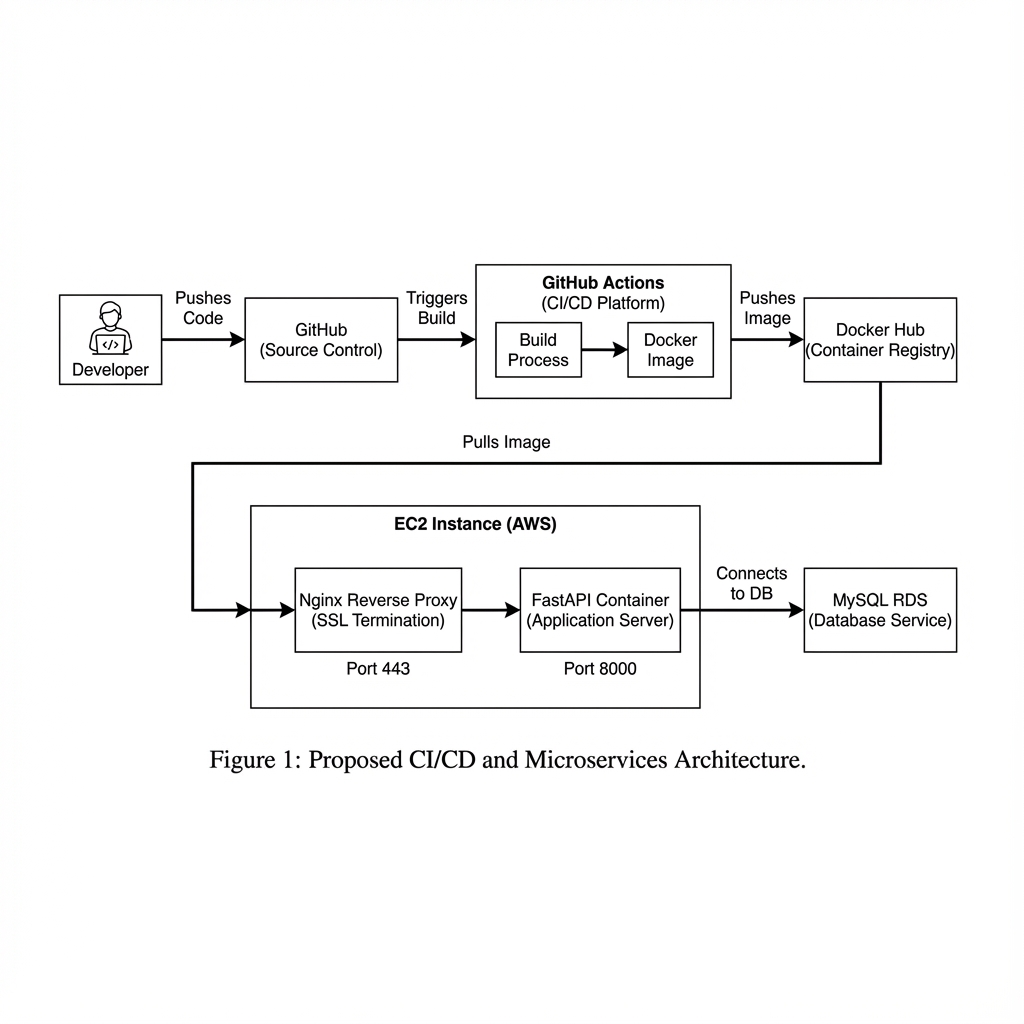
The architecture consists of:
- FastAPI: The backend application.
- MySQL RDS: Managed database service on AWS.
- Nginx: Reverse proxy to handle SSL termination and forward traffic to FastAPI.
- Certbot: Issues the Let’s Encrypt certificate; the historical renewal loop is audited below because it was not actually wired to the running Nginx challenge path.
- Docker Compose: Orchestrates the application, Nginx, and Certbot containers.
- GitHub Actions: CI/CD pipeline to build and deploy on every push to
main.
Implementation
Docker Compose Configuration
The historical docker-compose.yaml defined three services. The relevant detail is not just that Nginx and Certbot share volumes; it is which ACME authenticator created the certificate lineage. The deployed file used nginx:1.25 and an unpinned certbot/certbot tag. Both should be replaced with supported, reviewed versions or digests on a regular update cadence.
1
2
3
4
5
6
7
8
9
10
11
12
13
14
15
16
17
18
19
20
21
22
23
24
25
26
27
28
29
services:
  wapang:
    image: ${DOCKER_HUB_USERNAME}/wapang:latest
    env_file: .env
    # ... (omitted for brevity)

  nginx:
    image: nginx:1.25
    ports:
      - "80:80"
      - "443:443"
    volumes:
      - ./nginx/nginx.conf:/etc/nginx/nginx.conf:ro
      - ./data/certbot/conf:/etc/letsencrypt
      - ./data/certbot/www:/var/www/certbot
    depends_on:
      - wapang
    command: >-
      /bin/sh -c 'while :; do sleep 6h & wait $${!};
      nginx -s reload; done & nginx -g "daemon off;"'

  certbot:
    image: certbot/certbot
    volumes:
      - ./data/certbot/conf:/etc/letsencrypt
      - ./data/certbot/www:/var/www/certbot
    entrypoint: >-
      /bin/sh -c 'trap exit TERM; while :; do
      certbot renew; sleep 12h & wait $${!}; done;'
HTTPS & Certbot Workflow: Intended vs. Actual
The intended design was a webroot flow:
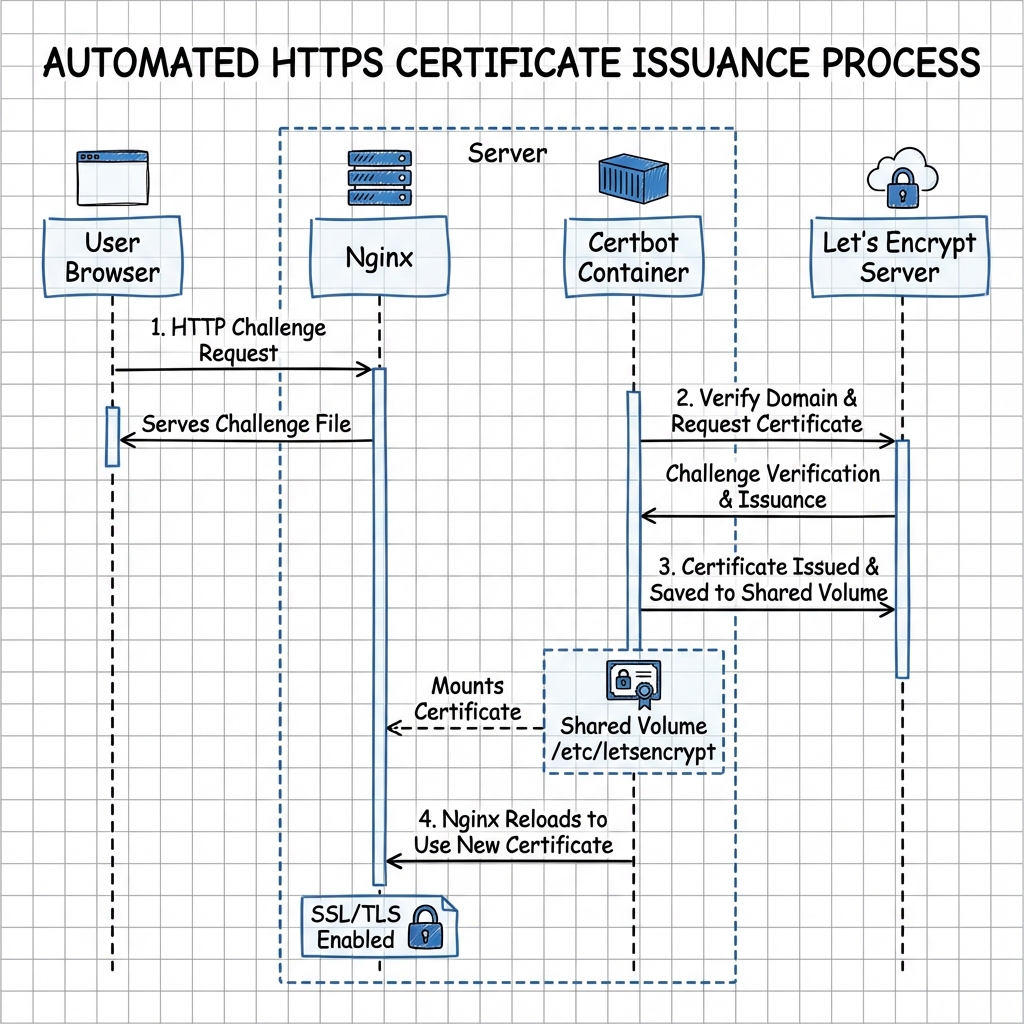
- Nginx serves the
.well-known/acme-challengedirectory. - Certbot places a challenge file in that directory.
- Let’s Encrypt verifies the file via HTTP.
- Upon success, certificates are saved to the shared
/etc/letsencryptvolume.
The diagram shows the intended webroot design. The historical bootstrap command did not configure that design.
The deployment workflow actually did this when no certificate existed:
1
2
3
4
5
6
7
8
docker compose down
docker run --rm -p 80:80 \
  -v "$PWD/data/certbot/conf:/etc/letsencrypt" \
  -v "$PWD/data/certbot/www:/var/www/certbot" \
  certbot/certbot certonly --standalone \
    --non-interactive --agree-tos --email "admin@$DOMAIN_NAME" \
    -d "$DOMAIN_NAME"
docker compose up -d
That first issuance works because the stack is down and the one-off container publishes host port 80. It also stores standalone as the lineage’s authenticator. After the stack starts, host port 80 routes to Nginx, while the long-running Certbot service publishes no host port. A due certbot renew therefore reuses standalone inside an unreachable container port; ACME requests reach Nginx’s webroot instead. The shared /var/www/certbot directory and Nginx’s ACME location do not switch an existing lineage from standalone to webroot.
Therefore the accurate status is:
- initial HTTPS issuance was automated,
- Nginx periodically reloaded certificates from the shared volume,
- unattended certificate renewal was not validated and is expected to fail when renewal becomes due.
A corrected deployment must choose one challenge strategy end to end:
- Webroot (preferred for no renewal downtime): start an HTTP-only bootstrap Nginx, issue with
certbot certonly --webroot -w /var/www/certbot, then enable the TLS server. Futurecertbot renewreuses webroot while Nginx remains online. - Standalone: schedule renewal at the host level, stop Nginx, run a one-off Certbot container that explicitly publishes host port 80 and mounts the existing certificate volume, then restart Nginx afterward. This accepts brief downtime and must restore Nginx even when renewal fails.
Whichever design is chosen, verify it with certbot renew --dry-run from the deployed environment and alert on renewal failure. A successful first certificate does not test the renewal path.
GitHub Actions Workflow
The initial workflow had one build-and-deploy job. A later source audit added the missing pytest gate, so the current recorded design has two jobs:
testrunsuv run pytest -qon pushes and pull requests.build-and-deploydeclaresneeds: testand runs only for a push tomain.- The deployment job builds and pushes the image, connects to EC2, writes
.envfrom GitHub Secrets, bootstraps the certificate when absent, and recreates the Compose stack.
The read-only vault mirror predates that CI change and still describes a single job; the vault wiki log records the post-audit two-job source state. That snapshot drift should not be mistaken for two workflows running at once.
Troubleshooting
This is where things got interesting.
Problem 1: Let’s Encrypt Rate Limit
Symptom
The deployment failed with the following error from Certbot:
1
2
An unexpected error occurred:
Error: too many certificates (5) already issued for this exact set of identifiers
Root Cause
I had triggered the deployment pipeline too many times while debugging other issues. Each failure attempted to issue a new certificate, eventually hitting Let’s Encrypt’s rate limit of 5 certificates per week for the same domain.
Solution
Per the Let’s Encrypt Rate Limits docs, the recommended approach is to validate your setup against the staging environment while debugging (staging has far higher limits), stop the failing retry loop so you don’t burn through more attempts, and wait for the limit window to reset (the certificates-per-week limit refills on a rolling basis).
In my case, an assignment deadline meant I couldn’t wait for the limit to refill, so as a situational workaround I switched to a new domain. I created a new DuckDNS domain (youngunghan-wapang-2.duckdns.org) and updated the DOMAIN_NAME secret in GitHub. Changing the domain sidesteps the per-identifier limit, but it’s a one-off shortcut rather than the general fix.
Problem 2: Nginx Crash (Missing Config)
Symptom
After changing the domain, Nginx refused to start, causing ERR_CONNECTION_REFUSED.
Root Cause
The nginx/nginx.conf file was accidentally deleted from the repository or not properly copied to the server. Without the configuration file, Nginx couldn’t start.
Solution
I restored the nginx/nginx.conf file and pushed it to the repository.
Problem 3: Database Connection Failure (502 Bad Gateway)
Symptom
Nginx started, but accessing the site returned 502 Bad Gateway. Checking the logs (docker logs wapang) revealed:
1
2
3
4
pydantic_core._pydantic_core.ValidationError: 3 validation errors for DatabaseSettings
dialect (missing)
driver (missing)
database (missing)
Root Cause
The wapang container was missing critical environment variables (DB_DIALECT, DB_DRIVER, DB_DATABASE). I had defined them in .env but failed to pass them correctly in docker-compose.yaml.
Solution
I updated docker-compose.yaml to explicitly pass these variables:
1
2
3
4
environment:
  - DB_DIALECT=${DB_DIALECT}
  - DB_DRIVER=${DB_DRIVER}
  - DB_DATABASE=${DB_NAME}
Problem 4: Auth Secrets Missing
Symptom
The application crashed again with:
1
2
3
pydantic_core._pydantic_core.ValidationError: 2 validation errors for AuthSettings
ACCESS_TOKEN_SECRET (missing)
REFRESH_TOKEN_SECRET (missing)
Root Cause
Similar to the database issue, the JWT signing secrets were missing from the environment configuration.
Solution
I added ACCESS_TOKEN_SECRET and REFRESH_TOKEN_SECRET to GitHub Secrets and updated both the CD pipeline (to write them to .env) and docker-compose.yaml (to pass them to the container).
Verification
At the time of the assignment, I verified the deployment with a Python script that registered a user through the public HTTPS API (sketch below — the request’s JSON payload and headers are elided as ...):
1
2
3
4
5
6
7
8
# verify_deployment.py
import urllib.request
import json

domain = "https://youngunghan-wapang-2.duckdns.org"
# ... (setup code) ...
req = urllib.request.Request(f"{domain}/api/users/", ...)
# ...
Result:
1
2
3
4
Status Code: 201
 Signup Successful!
   - HTTPS connection: Verified
   - RDS Database Write: Verified
This is a historical result, not an uptime claim. The DuckDNS endpoint was not reachable during the July 10, 2026 documentation audit, so readers should not expect the example domain to remain live.
Limitations / Caveats
This was a seminar assignment, so a few shortcuts are not production-grade:
- The rate-limit “fix” was situational. Switching to a new DuckDNS domain only sidestepped Let’s Encrypt’s per-identifier limit to meet a deadline; the real fix is to validate against the staging environment and stop the failing retry loop.
- Certificate renewal was not end-to-end. Initial standalone issuance published host port 80, but the running Certbot service reused the standalone authenticator without any host port while HTTP traffic went to Nginx’s webroot. Migrate the lineage to webroot or use a host-level standalone stop/run/start procedure, then pass
renew --dry-runand monitor failures. - Container versions. The observed deployment used the old
nginx:1.25line and an unpinnedcertbot/certbottag. Move to currently supported, reviewed versions or digests and update them on a security cadence. - Not zero-downtime. Deployment runs
docker compose up -d, so there is a brief gap while containers recreate; a blue-green or rolling strategy would remove it. - Secrets & DB. Secrets live in
.envon the host and in GitHub Secrets; RDS credentials and JWT secrets should be rotated and least-privileged for real use.
Conclusion
Building a CI/CD pipeline is rarely a “set it and forget it” process on the first try. It requires careful management of environment variables, secrets, and configuration files. Through this assignment, I learned the importance of checking container logs (docker logs) immediately when things go wrong and ensuring that local configuration changes are properly reflected in the deployment pipeline.
The assignment reached an HTTPS FastAPI deployment on EC2, but “fully automated” was too strong: the first certificate was automated while renewal still needed an end-to-end fix and monitoring. The broader lesson is to test lifecycle operations such as renewal and rollback, not just the first successful deployment.