UML Communication Diagram vs Sequence Diagram: When to Use Which
A practical comparison of UML Communication Diagrams and Sequence Diagrams with real-world use cases.
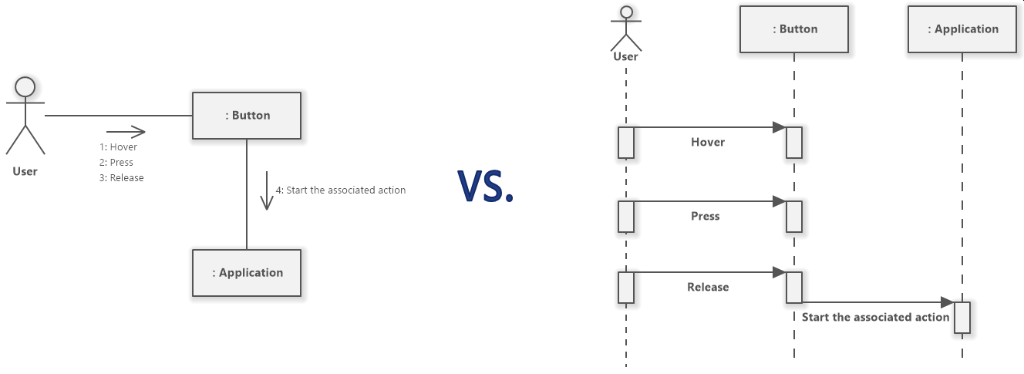
Introduction
While writing test documentation, I kept switching between Communication and Sequence diagrams without a clear reason. One reviewer asked: “Why did you use a sequence diagram here but a communication diagram there?” I didn’t have a good answer. After researching the UML spec and experimenting with both, I finally understood when to use each.
Same Scenario, Different Diagrams
Let’s visualize the same interaction both ways to see the difference:
Scenario: Tester calls Update API, then calls Undo API
Communication Diagram
Focus: Who talks to whom (structure)
flowchart LR
    T([Tester])
    U[Update API]
    D[Undo API]

    T -->|"1: POST /update"| U
    U -.->|"1.1: 200"| T
    T -->|"2: POST /undo"| D
    D -.->|"2.1: 200"| T
Sequence Diagram
Focus: What happens when (time)
sequenceDiagram
    participant T as Tester
    participant U as Update API
    participant D as Undo API

    T->>+U: POST /update
    U-->>-T: 200
    T->>+D: POST /undo
    D-->>-T: 200
Notice the difference? Communication shows the network of relationships. Sequence shows the timeline with activation bars.
When to Use Each
flowchart TD
    Q1{What question are you answering?}

    Q1 -->|"Which components interact?"| COMM
    Q1 -->|"What happens step by step?"| SEQ

    COMM[Communication Diagram]
    SEQ[Sequence Diagram]

    COMM --> C1["Architecture overview"]
    COMM --> C2["Test scenario summary"]
    COMM --> C3["Compact documentation"]

    SEQ --> S1["Detailed flow analysis"]
    SEQ --> S2["Debugging/tracing"]
    SEQ --> S3["Async/parallel operations"]
Decision Table
| Question | Answer | Use |
|---|---|---|
| “Which components are involved?” | Need to show connections | Communication |
| “What happens first, second, third?” | Need to show order | Sequence |
| “How does the whole system look?” | Architecture view | Communication |
| “Why did step 3 fail?” | Debug/trace | Sequence |
| “Space is limited” | Need compact diagram | Communication |
| “Many back-and-forth messages” | Complex interaction | Sequence |
Detailed Comparison
| Aspect | Communication Diagram | Sequence Diagram |
|---|---|---|
| Layout | Free-form network | Vertical timeline |
| Message Order | Explicit numbers (1, 1.1, 2) | Implicit (top→bottom) |
| Activation | Not shown | Bars show active objects |
| Loops/Alt | Hard to show | Native support (loop, alt) |
| Space | Compact, fits overview | Grows vertically |
| Mermaid | Workaround (flowchart) | Native support |
| Best For | “Big picture” | “Step-by-step” |
Real-World Use Cases
1. Test Scenario Overview (Communication)
When documenting test coverage, show all APIs involved:
flowchart LR
    T([Tester])
    L[Listing API]
    S[Search API]
    U[Update API]
    X[Undo API]

    T --> L
    T --> S
    T --> U
    T --> X
2. Single Test Flow (Sequence)
When documenting one specific test, show the exact steps:
sequenceDiagram
    participant T as Tester
    participant A as API
    participant DB as Database

    T->>+A: GET /listing
    A->>+DB: SELECT
    DB-->>-A: rows
    A-->>-T: 200 (original data)

    T->>+A: POST /update (modify row)
    A->>+DB: UPDATE
    DB-->>-A: affected=1
    A-->>-T: 200

    T->>+A: GET /listing
    A->>+DB: SELECT
    DB-->>-A: rows
    A-->>-T: 200 (modified data)
Mermaid Tips
Communication Diagram Workaround
Mermaid doesn’t support Communication Diagrams natively. Use flowchart LR:
1
2
3
4
5
6
7
8
```mermaid
flowchart LR
A[Object A]
B[Object B]
A -->|"1: request"| B
B -.->|"1.1: response"| A
```
Conventions:
-->for request (solid arrow)-.->for response (dashed arrow)"1: message"for numbered labels
Sequence Diagram Native
1
2
3
4
5
```mermaid
sequenceDiagram
A->>+B: request
B-->>-A: response
```
Conventions:
->>for sync call-->>for response+/-for activation bars
Summary
| Situation | Use |
|---|---|
| Overview documentation | Communication |
| Test scenario list | Communication |
| Detailed test flow | Sequence |
| Debugging failed test | Sequence |
| Architecture diagram | Communication |
| API interaction trace | Sequence |
Rule of thumb: Start with Communication for the overview, add Sequence for important details.