Building a CI/CD Pipeline for FastAPI Application with GitHub Actions and AWS EC2
Introduction
This post documents my experience building an automated CI/CD pipeline for a FastAPI application. The goal was simple: push code to GitHub, and it automatically deploys to AWS EC2. What seemed straightforward turned into a multi-hour debugging session that taught me valuable lessons about Docker, async/sync database drivers, and SSH authentication.
Architecture Overview
The pipeline architecture follows a standard CI/CD flow:
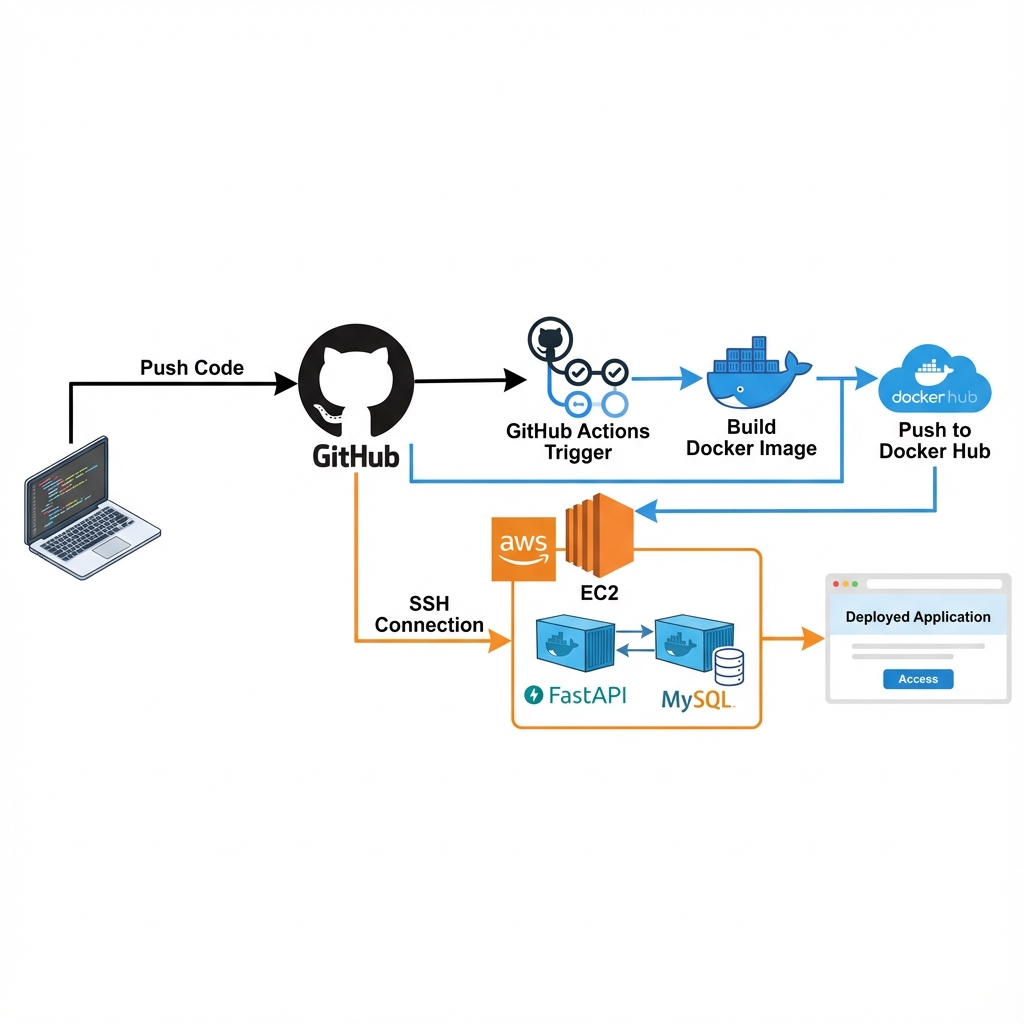
Tech Stack:
- Application: FastAPI + MySQL (Docker Compose)
- CI/CD: GitHub Actions
- Container Registry: Docker Hub
- Deployment Target: AWS EC2 (Ubuntu)
Workflow:
- Developer pushes code to
mainbranch - GitHub Actions triggers automatically
- Docker image is built and pushed to Docker Hub
- GitHub Actions SSHs into EC2
- EC2 pulls latest image and restarts containers
Implementation
Docker Compose Configuration
The application uses two containers orchestrated by Docker Compose:
1
2
3
4
5
6
7
8
9
10
11
12
13
14
15
16
17
18
19
20
21
22
23
24
25
26
27
28
version: "3.8"
services:
  db:
    image: mysql:8.0
    container_name: app_db
    environment:
      MYSQL_DATABASE: appdb
      MYSQL_USER: appuser
      MYSQL_PASSWORD: ${DB_PASSWORD}
    volumes:
      - db_data:/var/lib/mysql
    healthcheck:
      test: ["CMD", "mysqladmin", "ping", "-h", "localhost"]
      timeout: 20s
      retries: 10

  app:
    image: ${DOCKER_HUB_USERNAME}/myapp:latest
    container_name: app
    env_file:
      - .env.prod
    ports:
      - "8000:8080"
    command: sh -c "uv run alembic upgrade head && uv run uvicorn app.main:app --host 0.0.0.0 --port 8080"
    restart: always
    depends_on:
      db:
        condition: service_healthy
Key Design Choice: The depends_on with service_healthy ensures the database is fully ready before the application starts. This prevents connection errors during startup.
GitHub Actions Workflow
1
2
3
4
5
6
7
8
9
10
11
12
13
14
15
16
17
18
19
20
21
22
23
24
25
26
27
28
29
30
31
32
33
34
35
36
37
38
39
name: CI/CD Pipeline

on:
  push:
    branches: [main]

jobs:
  build:
    runs-on: ubuntu-latest
    steps:
      - uses: actions/checkout@v4

      - name: Login to Docker Hub
        uses: docker/login-action@v3
        with:
          username: $
          password: $

      - name: Build and Push
        run: |
          docker build -t $/myapp:latest .
          docker push $/myapp:latest

  deploy:
    needs: build
    runs-on: ubuntu-latest
    steps:
      - name: Deploy to EC2
        uses: appleboy/ssh-action@v1.0.3
        with:
          host: $
          username: $
          key: $
          script: |
            cd ~/app
            sudo docker pull $/myapp:latest
            sudo DOCKER_HUB_USERNAME=$ docker-compose down
            sudo DOCKER_HUB_USERNAME=$ docker-compose up -d
            sudo docker image prune -af
Problem 1: Missing Database Container
Symptom
1
2
sqlalchemy.exc.OperationalError: (MySQLdb.OperationalError)
(2003, "Can't connect to MySQL server on 'db'")
Root Cause
My initial docker-compose.yaml only defined the application service. I assumed the database would be handled separately, but the application expected a container named db on the same Docker network.
Solution
Added MySQL service to docker-compose.yaml with:
- Proper health check to ensure database readiness
- Named volumes for data persistence
depends_onwith health check condition
Lesson: Always define all service dependencies in your compose file, even if you plan to use external databases later.
Problem 2: Alembic Async Driver Issue
Symptom
1
2
sqlalchemy.exc.MissingGreenlet: greenlet_spawn has not been called;
can't call await_only() here
Root Cause
The application correctly uses aiomysql (async driver) for runtime database operations. However, Alembic migrations run in a synchronous context and cannot use async drivers.
Analysis
Looking at the error stack trace:
1
2
File "/app/wapang/database/alembic/env.py", line 72, in run_migrations_online
    with connectable.connect() as connection:
Alembic’s env.py was trying to create a synchronous connection using an async driver URL.
Solution
Modified alembic/env.py to force synchronous driver during migrations:
1
2
3
4
5
6
7
8
9
10
11
12
13
14
15
16
from wapang.database.settings import DB_SETTINGS

# Force sync driver for Alembic
sync_url = DB_SETTINGS.url.replace("+aiomysql", "+pymysql")
config.set_main_option("sqlalchemy.url", sync_url)

def run_migrations_online() -> None:
    connectable = create_engine(sync_url, poolclass=pool.NullPool)

    with connectable.connect() as connection:
        context.configure(
            connection=connection,
            target_metadata=target_metadata
        )
        with context.begin_transaction():
            context.run_migrations()
Lesson: Async and sync contexts require different database drivers. Alembic migrations need synchronous drivers even when your application uses async operations.
Problem 3: Missing Authentication Secrets
Symptom
1
2
3
pydantic_core._pydantic_core.ValidationError: 2 validation errors for AuthSettings
ACCESS_TOKEN_SECRET: Field required
REFRESH_TOKEN_SECRET: Field required
Root Cause
The .env.prod file on EC2 was missing authentication-related environment variables that the application validates on startup using Pydantic.
Solution
Added to .env.prod:
1
2
ACCESS_TOKEN_SECRET=your-access-token-secret-here
REFRESH_TOKEN_SECRET=your-refresh-token-secret-here
Created env.prod.example in the repository to document all required variables:
1
2
3
4
5
6
7
8
9
10
11
12
13
14
15
16
# Database
DB_DIALECT=mysql
DB_DRIVER=aiomysql
DB_HOST=db
DB_PORT=3306
DB_USER=appuser
DB_PASSWORD=secure_password
DB_DATABASE=appdb

# Application
DEBUG=False
SECRET_KEY=your-secret-key

# Authentication
ACCESS_TOKEN_SECRET=your-access-token-secret
REFRESH_TOKEN_SECRET=your-refresh-token-secret
Lesson: Always maintain an example environment file in version control to document required configuration variables.
Problem 4: SSH Key Authentication Failure
Symptom
1
2
ssh: handshake failed: ssh: unable to authenticate,
attempted methods [none], no supported methods remain
Root Cause
The EC2_SSH_KEY GitHub Secret was improperly formatted. SSH private keys are extremely sensitive to formatting - any missing newline or extra space breaks authentication.
Solution
Ensured the private key in GitHub Secrets includes:
- Complete
-----BEGIN RSA PRIVATE KEY-----header - All key content with proper line breaks
- Complete
-----END RSA PRIVATE KEY-----footer - No extra whitespace before or after
Example of correct format:
1
2
3
4
5
-----BEGIN RSA PRIVATE KEY-----
MIIEpAIBAAKCAQEAx...
(multiple lines)
...ending_characters
-----END RSA PRIVATE KEY-----
Lesson: When copying SSH keys to secrets managers, preserve exact formatting including all newlines.
Problem 5: Docker Permission Denied in CI/CD
Symptom
1
2
permission denied while trying to connect to the Docker daemon socket
at unix:///var/run/docker.sock
Root Cause
Even though the ubuntu user was added to the docker group during EC2 setup, SSH remote commands don’t inherit group memberships in the same way as interactive sessions.
Solution
Prefix all Docker commands with sudo in the deployment script:
1
2
3
4
5
6
script: |
  cd ~/app
  sudo docker pull $/myapp:latest
  sudo DOCKER_HUB_USERNAME=$ docker-compose pull
  sudo DOCKER_HUB_USERNAME=$ docker-compose down
  sudo DOCKER_HUB_USERNAME=$ docker-compose up -d
Important: When using sudo with environment variables, you must explicitly pass them through sudo VARIABLE=value command.
Lesson: Remote SSH command execution behaves differently from interactive shells. Explicit sudo usage is often necessary in CI/CD contexts.
Results
After resolving all issues, the pipeline works flawlessly:
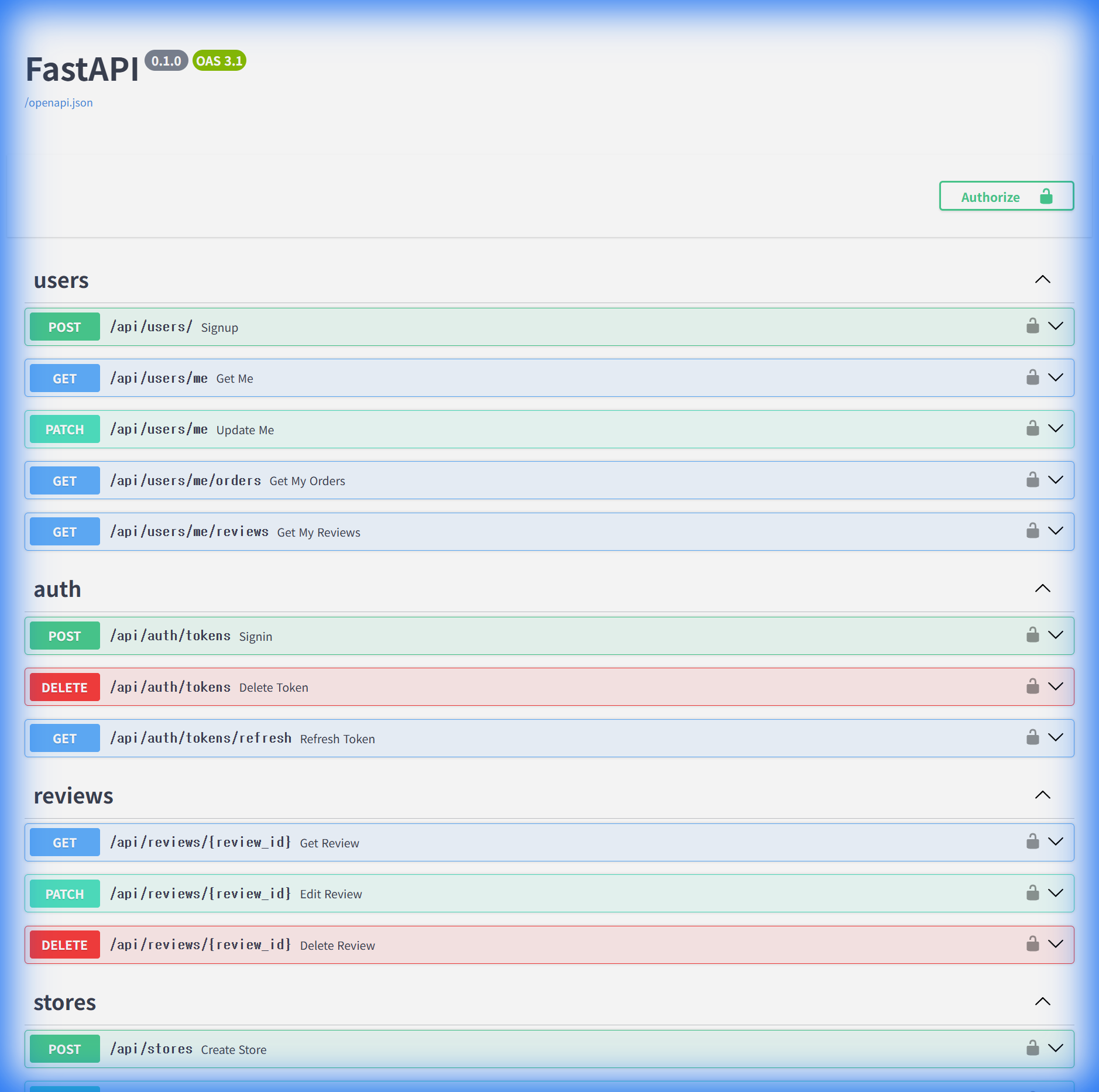
The application is now accessible at the deployed endpoint, with Swagger UI showing all available API routes.
Deployment Metrics:
- Build time: ~2-3 minutes
- Deployment time: ~30 seconds
- Total automation: Push to production in under 4 minutes
- Zero downtime deployments via Docker container orchestration
Security Considerations
- Secrets Management: All sensitive data stored in GitHub Secrets, never in repository
- Environment Separation: Production variables in
.env.prodon server only - SSH Key Security: Private key with proper permissions (600), stored only in GitHub Secrets
- EC2 Security Groups: Limited to necessary ports (22 for SSH, 8000 for application)
Key Takeaways
- Database Health Checks: Always wait for dependencies to be ready before starting dependent services
- Async vs Sync Drivers: Migration tools like Alembic need synchronous drivers even when the application uses async
- Environment Documentation: Maintain example config files to document all required variables
- SSH Key Formatting: Private keys must preserve exact formatting including all line breaks
- CI/CD Permissions: Use explicit
sudoin automated deployment scripts; don’t rely on group memberships
Conclusion
Building this CI/CD pipeline took significantly longer than expected due to the various issues encountered. However, each problem taught valuable lessons about Docker containerization, database driver compatibility, and deployment automation.
The end result is a robust pipeline that saves hours of manual deployment work and reduces the risk of human error. What once required multiple manual steps now happens automatically on every code push.