Migrating Tech Blog from WENIVLOG to Jekyll Chirpy Theme
Migrating a tech blog from WENIVLOG to the Jekyll Chirpy theme on GitHub Pages.
Introduction
This post documents the complete migration process from WENIVLOG (a JavaScript-based blog platform) to Jekyll Chirpy theme. The goal was to leverage Jekyll’s modern static site generator capabilities while preserving all existing content and adding features like dark mode, search functionality, and better SEO.
Architecture Overview
Before (WENIVLOG):
- JavaScript-based dynamic rendering
- Manual blog list management (
local_blogList.json) - Custom CSS/JS for styling
- Posts stored as raw Markdown files
After (Jekyll Chirpy):
- Static site generation with Jekyll
- Automated post discovery via
_posts/convention - Built-in theme with dark/light mode
- GitHub Actions for automated deployment
Migration Strategy
1. Repository Setup
I created a new repository (scitechblog) to preserve the original blog as a backup. At the time, I cloned the theme source repository and then repointed Git to my own empty repository:
1
2
3
4
5
6
7
8
9
10
# Historical path used for this migration
git clone https://github.com/cotes2020/jekyll-theme-chirpy scitechblog
cd scitechblog

# Keep the original repository as an explicitly named upstream,
# and make the personal repository the push target.
git remote rename origin chirpy-upstream
git remote add origin https://github.com/youngunghan/scitechblog.git
git branch -M master
git push -u origin master
Without the remote handoff, origin still points at cotes2020/jekyll-theme-chirpy; a later git push origin ... does not publish to the new personal repository.
For a new blog today, use GitHub’s Use this template action on Chirpy Starter, create the repository under your own account, and clone that repository. The starter is the blog-oriented distribution; cloning the theme source is appropriate when developing Chirpy itself and is the historical reason this migration later encountered theme-development files.
Key Decision: Keep the original techblog repository untouched for rollback capability. The branch name is not universal: this repository currently uses master, while Chirpy Starter uses main; the Pages workflow and push commands must use the branch that actually exists.
2. Configuration (_config.yml)
Updated core site settings:
1
2
3
4
5
6
7
8
9
10
11
12
13
14
15
16
17
18
19
20
21
# Site metadata
timezone: Asia/Seoul
title: RailCSE
tagline: Computer Science × AI × Railroad Science
description: >-
  Tech blog focusing on AI, DevOps, and Software Engineering

# Deployment
url: https://youngunghan.github.io
baseurl: /scitechblog

# Author info
social:
  name: Seoultech
  email: youngunghan@gmail.com
  links:
    - https://github.com/youngunghan

# Assets
avatar: /assets/img/avatar.jpg
cdn: # Commented out to use local assets
Lesson: Setting baseurl correctly is critical for GitHub Pages Project Sites.
3. Content Migration
Post Format Conversion
WENIVLOG used a custom naming convention:
1
[20251125]_[Title]_[category]_[thumbnail]_[description]_[author].md
Jekyll Chirpy requires:
1
_posts/YYYY-MM-DD-slug.md
Conversion process:
- Parse filename to extract metadata
- Create YAML front matter
- Update image paths
- Rename file to Jekyll convention
Example migration:
Before:
1
2
# Building a CI/CD Pipeline for FastAPI...
(plain markdown content)
After:
1
2
3
4
5
6
7
8
9
10
11
12
13
---
title: "Building a CI/CD Pipeline for FastAPI Application"
date: 2025-11-25 00:00:00 +0900
categories: [DevOps, CI/CD]
tags: [fastapi, github-actions, aws-ec2, docker, mysql]
author: seoultech
image:
  path: assets/img/posts/cicd-pipeline/cicd_architecture.png
  alt: CI/CD Architecture Diagram
---

## Introduction
...
Image Reorganization
Moved images from WENIVLOG structure to Chirpy convention:
1
2
3
4
5
6
7
# From:
img/cicd_blog_post/*.png
img/y-axis_stability.png

# To:
assets/img/posts/cicd-pipeline/*.png
assets/img/posts/matplotlib-yaxis/*.png
Updated image references in posts:
1
2
3
4
5
# Before

# After

Problem 1: Conventional Commits Requirement
Symptom
1
2
3
Error: You have commit messages with errors
✖   subject may not be empty [subject-empty]
✖   type may not be empty [type-empty]
Root Cause
The Chirpy repository enforces Conventional Commits format through a commitlint workflow. Regular commit messages like "Add GitHub Pages deployment workflow" fail validation.
Solution
Reformatted all commits to follow Conventional Commits:
1
2
3
4
5
# Before
git commit -m "Add GitHub Pages deployment workflow"

# After
git commit -m "ci: add GitHub Pages deployment workflow"
Commit Types:
feat:New featuresfix:Bug fixesdocs:Documentation changesstyle:Code formattingrefactor:Code refactoringci:CI/CD changeschore:Maintenance tasks
Lesson: Always check repository’s CI/CD requirements before pushing commits.
Problem 2: Gemspec-based Gemfile
Symptom
Build workflow failed with:
1
Build and Deploy #2: 45s (failed)
Inspecting the error logs revealed:
1
2
Error loading the published version:
can't find gem jekyll-theme-chirpy
Root Cause
The cloned theme-source repository intentionally contained a developer-oriented Gemfile:
1
2
3
4
5
6
# frozen_string_literal: true
source "https://rubygems.org"

gemspec  # Resolve dependencies from the local theme gemspec

gem "html-proofer", "~> 5.0", group: :test
That setup is valid inside a complete theme-source checkout: Bundler resolves the local jekyll-theme-chirpy.gemspec. The Git history confirms that the gemspec existed, so the recorded error cannot be blamed on gemspec itself. The surviving log does not preserve enough context to distinguish a wrong working directory, incomplete checkout, stale workflow cache, or another Bundler-resolution problem. Replacing the Gemfile changed the ownership model and made the build pass, but it did not prove the original root cause.
Analysis
Jekyll Chirpy provides two common starting distributions:
- Chirpy Starter (for users) - uses theme as a gem
- Theme Repository (for developers) - uses gemspec
This repository started from the theme source rather than Starter. There are three coherent ownership models:
- Starter/gem-based site: depend on a released
jekyll-theme-chirpygem and keep only deliberate local overrides. - Theme development: keep the local gemspec and the full theme source together.
- Vendored/source-owned site: track the full theme source in the blog, optionally keep an exactly pinned released gem as fallback, and build matching frontend assets locally/CI. Local layouts/includes shadow the gem, so the vendored source and gem must stay on the same Chirpy release.
The current repository intentionally uses the third model with Chirpy 7.4.1. The important rule is consistency, not a forced two-way choice.
Historical Mitigation
The migration switched to a released-gem Gemfile, which removed the immediate Bundler failure:
1
2
3
4
5
6
7
8
9
10
11
12
13
14
15
16
17
18
19
20
21
22
23
24
25
# frozen_string_literal: true
source "https://rubygems.org"

gem "jekyll", "~> 4.3"
gem "jekyll-theme-chirpy", "~> 7.4" # historical version used in this migration

group :test do
  gem "html-proofer", "~> 5.0"
end

# Windows and JRuby support
platforms :mingw, :x64_mingw, :mswin, :jruby do
  gem "tzinfo", ">= 1", "< 3"
  gem "tzinfo-data"
end

gem "wdm", "~> 0.2.0", :platforms => [:mingw, :x64_mingw, :mswin]

# Plugins
group :jekyll_plugins do
  gem "jekyll-paginate"
  gem "jekyll-seo-tag"
  gem "jekyll-archives"
  gem "jekyll-sitemap"
end
Then removed the gemspec file:
1
2
3
4
5
git rm jekyll-theme-chirpy.gemspec
bundle install
git add Gemfile Gemfile.lock
git commit -m "fix: update Gemfile for blog usage"
git push origin master
Afterward, commit Gemfile.lock and update the gem, copied templates/SCSS, and built JavaScript as one tested version set. A broad version constraint without a lockfile can otherwise install a newer theme behind old local overrides.
Lesson: Use Chirpy Starter for a blog. If converting a theme-source clone, replace the dependency model coherently rather than deleting the gemspec while leaving theme-development assumptions elsewhere.
Problem 3: GitHub Pages Source Not Configured
Symptom
After successful build:
1
Build and Deploy #3:  Success (38s)
But visiting https://youngunghan.github.io/scitechblog showed:
1
404 - There isn't a GitHub Pages site here.
Root Cause
GitHub Pages has two deployment methods:
- Deploy from a branch (legacy)
- GitHub Actions (modern)
By default, new repositories use “Deploy from a branch”. Our workflow uploads to GitHub Pages but the setting wasn’t configured to use it.
Solution
Changed GitHub Pages source in repository settings:
- Navigate to
https://github.com/youngunghan/scitechblog/settings/pages - Under “Build and deployment”
- Change Source from “Deploy from a branch” to “GitHub Actions”
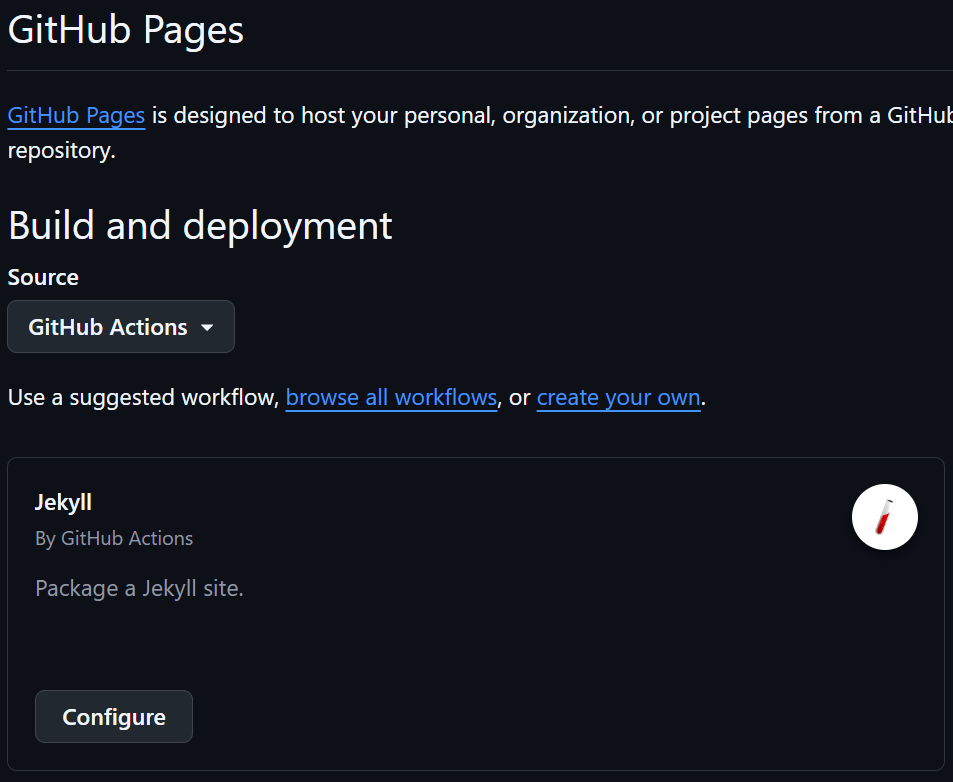
Lesson: GitHub Pages deployment source must match your workflow method. Always verify this setting after pushing workflows.
Problem 4: Menu Page Structure
Symptom
After migrating the menu pages, the custom About and Contact tabs showed up after Chirpy’s default tabs (CATEGORIES, TAGS, ARCHIVES, and ABOUT — HOME is hardcoded in the sidebar, not a _tabs file) instead of near the front of the sidebar.
For context, WENIVLOG used flat menu/ pages:
1
2
3
4
menu/about.md
menu/contact.md (with CV PDF)
menu/challenge.md
menu/blog.md
Chirpy instead uses _tabs/ with order:-based front matter, so the layout doesn’t map over directly.
Analysis
- Chirpy ships default
_tabs/pages — CATEGORIES, TAGS, ARCHIVES, and ABOUT (rendered in ascendingorder:); HOME is hardcoded in the sidebar, not a_tabsfile - Custom pages go in
_tabs/withorder:field - Each tab needs
icon:andtitle:(or filename determines title)
Solution
Migrated menu pages to _tabs/:
1
2
3
4
5
6
7
8
---
# _tabs/about.md
icon: fas fa-info-circle
order: 1
---

## Who Am I?
...
1
2
3
4
5
6
7
8
---
# _tabs/challenge.md
icon: fas fa-trophy
order: 2
---

# AI Challenge
...
Initial Order Issue: Set About to order: 4, Contact to order: 5, but this pushed them after all default tabs.
Refined:
- Removed unnecessary CV/Contact page (too formal for tech blog)
- Set About to
order: 1(first custom tab) - Set Challenge to
order: 2 - HOME tab always appears first regardless of order
Lesson: Lower order values appear first. HOME is special and always first.
Problem 5: Author Attribution
Symptom
During the initial four-post migration, posts showed different authors:
- Some:
youngunghan - Others: No author specified
Root Cause
During initial migration, author field was:
- Set to GitHub username in CI/CD post
- Missing in other posts
The preferred explicit author identifier was seoultech. In Chirpy, an explicit author: seoultech must resolve to a seoultech entry in _data/authors.yml. A post with no author is a separate, valid case and falls back to the site’s social.name metadata.
Solution
For the four posts migrated at that time, I normalized the explicit field and defined the identifier in _data/authors.yml:
1
2
3
4
---
title: "Post Title"
author: seoultech  # Explicit ID for these migrated posts
---
1
2
3
4
# _data/authors.yml
seoultech:
  name: Seoultech
  url: https://github.com/youngunghan
I also updated the site-wide fallback in _config.yml:
1
2
social:
  name: Seoultech  # ← Default author
This does not mean every later post must contain author:. The current archive includes both explicit seoultech posts and posts that intentionally use the site fallback.
Lesson: Decide on an attribution strategy early. Keep explicit author IDs synchronized with _data/authors.yml, and document when omission means the site-wide fallback.
Results
Final Site Structure
1
2
3
4
5
6
7
8
9
10
11
12
13
14
15
16
17
18
19
20
21
22
23
scitechblog/
├── _posts/
│   ├── 2024-11-12-tauri-m1-mac-setup.md
│   ├── 2024-11-14-matplotlib-yaxis-stability.md
│   ├── 2024-11-15-python-import-issues.md
│   └── 2025-11-25-cicd-pipeline-fastapi.md
├── _tabs/
│   ├── about.md
│   ├── archives.md (default)
│   ├── categories.md (default)
│   ├── challenge.md
│   └── tags.md (default)
├── assets/
│   └── img/
│       ├── avatar.jpg
│       └── posts/
│           ├── cicd-pipeline/
│           ├── matplotlib-yaxis/
│           ├── python-import/
│           └── tauri-setup/
├── _config.yml
├── Gemfile
└── .github/workflows/pages-deploy.yml
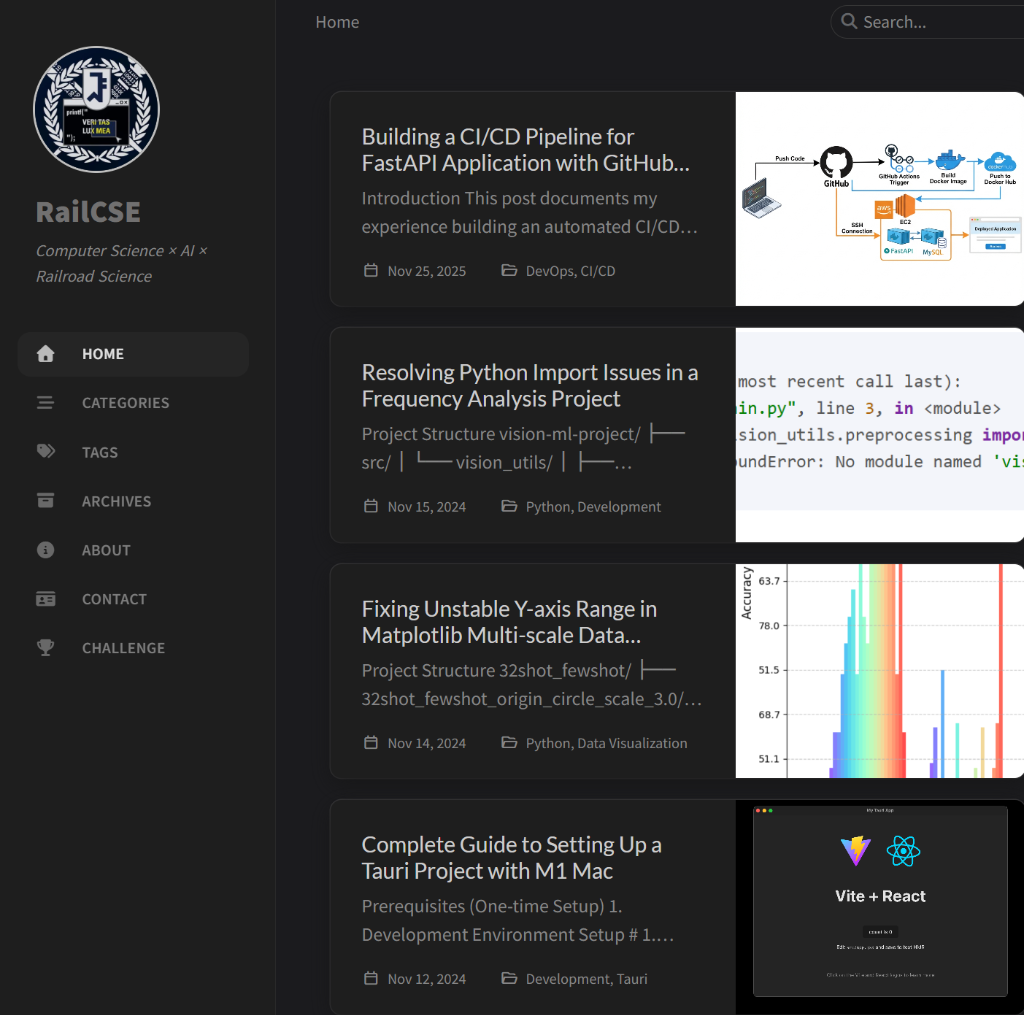
Site Features
Navigation:
1
HOME → ABOUT → CHALLENGE → CATEGORIES → TAGS → ARCHIVES
Post Management:
- 4 technical posts successfully migrated (at the time of migration)
- All images displaying correctly
- Code syntax highlighting working
- Korean text rendering properly
Theme Features:
- Dark/Light mode toggle
- Search functionality
- Category/Tag organization
- Responsive design
- SEO optimization
Deployment Metrics
- Build Time: ~35-40 seconds
- GitHub Actions: Automated for qualifying pushes to the configured deployment branches, except paths excluded by
paths-ignore - Availability: Not measured by the build workflow; a successful deployment is not evidence of 100% uptime
- Manual Intervention: No manual publish step after the initial setup for successful workflow runs
Key Takeaways
- Repository Choice Matters
- Use Chirpy Starter for new blogs
- Use the theme repository when developing Chirpy itself
- If a blog vendors the full theme source, pin it coherently with the gem and frontend build rather than partially upgrading one layer
- Conventional Commits
- Always review CI/CD requirements
- Use proper commit message format
- Understand commitlint if enforced
- GitHub Pages Configuration
- Verify deployment source setting
- Match workflow to deployment method
- Test deployment in a staging branch first
- Content Migration Strategy
- Plan front matter structure early
- Batch process similar content
- Maintain backup of original content
- Navigation Design
- Simplify menu for focused content
- Consider if CV/contact pages are necessary
- Use
order:field strategically
Conclusion
Migrating from WENIVLOG to Jekyll Chirpy took approximately 2 hours, including troubleshooting. The main challenges were understanding Jekyll’s conventions, debugging GitHub Actions workflows, and adapting to Conventional Commits requirements.
The result is an automated static-site publishing workflow with better developer experience and built-in features that would have required custom development in WENIVLOG. Availability still needs independent monitoring; GitHub Actions only reports whether a build and deployment job completed.
Before vs After:
- Manual deployment → Automated GitHub Actions
- No search → Built-in search
- No dark mode → Theme switching
- Custom navigation code → Built-in tab system
- JavaScript rendering → Static HTML (faster)