[Troubleshooting] Jekyll Blog Image Path & HTMLProofer Errors (Double Baseurl)
Resolving the 'internal image does not exist' error caused by double baseurl duplication in Jekyll Chirpy theme.
Introduction
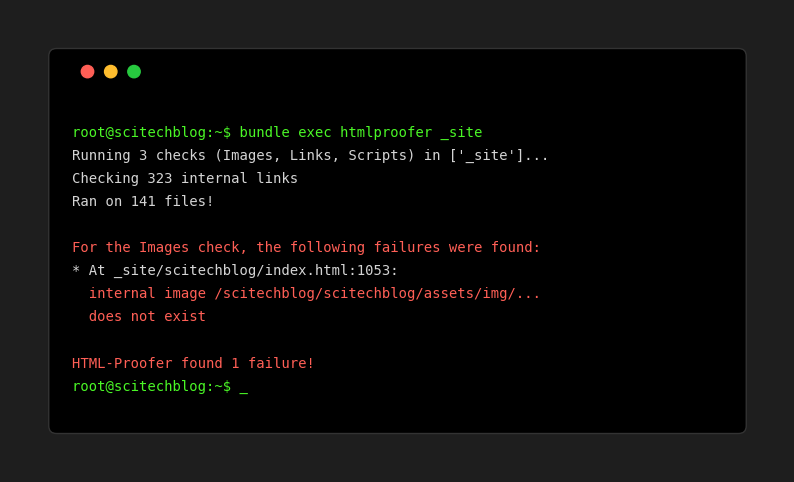
While migrating my algorithm solutions to this Jekyll (Chirpy theme) blog, I encountered a persistent error in the CI/CD pipeline. htmlproofer, which checks for broken links and images, kept failing with a strange error:
1
internal image /scitechblog/scitechblog/assets/img/posts/algo/leetcode.png does not exist
Notice the double baseurl (/scitechblog/scitechblog/). This post documents the troubleshooting process, the root cause, and the solution.
The Problem
My blog is hosted on GitHub Pages with a project url: https://youngunghan.github.io/scitechblog. Therefore, the baseurl is set to /scitechblog in _config.yml.
When I added images to my posts, I initially tried two approaches:
- Absolute Path in Markdown:
path: /scitechblog/assets/img/... - Relative Path + HTML Logic:
path: /assets/img/...and usingrelative_urlfilter in Liquid.
Both approaches resulted in the same error: Double Baseurl. The generated HTML looked like this: <img src="/scitechblog/scitechblog/assets/img/..." ...>
This meant that something was prepending the baseurl automatically, and my manual attempts were adding it a second time.
Root Cause Analysis
I investigated the _layouts/home.html file, which renders the post previews.
1
2
3
<!-- _layouts/home.html (Simplified) -->

<img src="" ...>
At first glance, it looks like raw output. However, the Jekyll Chirpy theme (and its plugins) has hidden logic to handle asset paths.
- Theme Logic: The theme is designed to handle
assets/img/...paths automatically. - Conflict: When I manually added
/scitechblogin the Markdown front matter, the theme still prepended thebaseurl, resulting in/scitechblog/scitechblog/.... - HTML Modification: Even when I tried to fix it in HTML using
relative_urlfilter, it conflicted with the theme’s internal processing (likely viajekyll-relative-linksor similar plugins).
The Solution
The solution was counter-intuitive: Do less.
I reverted all my “fixes” in the HTML and Markdown files.
1. Revert HTML
I restored _layouts/home.html to its original state, removing any relative_url filters or manual baseurl appending logic.
2. Clean Markdown Paths
I updated all Markdown files to use relative paths without a leading slash:
1
2
image:
  path: assets/img/posts/algo/leetcode.png
3. Layout Adjustment (The Real Fix)
However, simply using relative paths caused issues on pagination pages (e.g., /page2/). The theme expects absolute paths (starting with /) to correctly prepend the baseurl.
I modified _layouts/home.html to ensure all image paths start with /, but without using the relative_url filter (which causes double duplication).
1
2
3
<!-- _layouts/home.html -->

<img src="/" ...>
This forces the path to be /assets/img/.... The theme’s internal logic then detects this absolute path and automatically prepends /scitechblog, resulting in the correct /scitechblog/assets/img/....
Comparison: Original vs. Fork
I created this blog by forking jekyll-theme-chirpy.
- Original Repo: Designed to be generic. It expects users to follow standard Jekyll conventions (relative paths for assets).
- My Fork: In my attempt to customize and “fix” things for my specific
baseurl, I broke the standard behavior.
Key Takeaway: When using a robust theme like Chirpy, trust its default behavior first. Manually forcing paths often leads to conflicts with built-in plugins.
Conclusion
If you encounter “double baseurl” errors in Jekyll:
- Check if you are manually adding
baseurlin Markdown. - Check if you are using
relative_urlfilter on a path that already hasbaseurl. - Try using simple relative paths (
assets/...) and let Jekyll handle the rest.
Now, my CI/CD pipeline passes with 0 errors!