[Troubleshooting] Training MMDetection RTMDet on a Single 8 GB GPU: A Version-Pinning Survival Guide
RTMDet trains great on one consumer GPU — once you survive the prebuilt-wheel lock, a pkg_resources crash, and a pip ResolutionImpossible (and debunk the SyncBN scare). The exact pins and fixes that worked.
Introduction
RTMDet’s paper trains on 8 GPUs. I wanted to fine-tune RTMDet-m on one RTX 4060 Ti (8 GB) in WSL2. The model itself fits comfortably — the hard part was getting OpenMMLab’s stack to install and start on a single, non-distributed setup. What followed was a version-pinning gauntlet: a missing prebuilt wheel, a pkg_resources crash, and a pip resolver that refuses to install at all — plus a SyncBN scare that turned out to be a non-issue. This post records the exact symptoms, root causes, and the pins that ended up working.
Environment (where these reproduce). WSL2 (Ubuntu) · NVIDIA RTX 4060 Ti 8 GB · CUDA 12.1 · conda env, Python 3.10.20. Verified stack:
torch 2.1.0+cu121,torchvision 0.16.0+cu121,mmcv 2.1.0,mmengine 0.10.7,mmdet 3.3.0,numpy 1.26.4,setuptools 69.5.1,opencv-python 4.13.0.92. Bugs depend on versions — these are the ones I hit. My live env happens to runopencv-python 4.13.0.92(fine at runtime), butopencv-python 4.13can’t be clean-installed againstnumpy<2— for a reproducible install pinopencv-python==4.11.0.86(Problem 4).
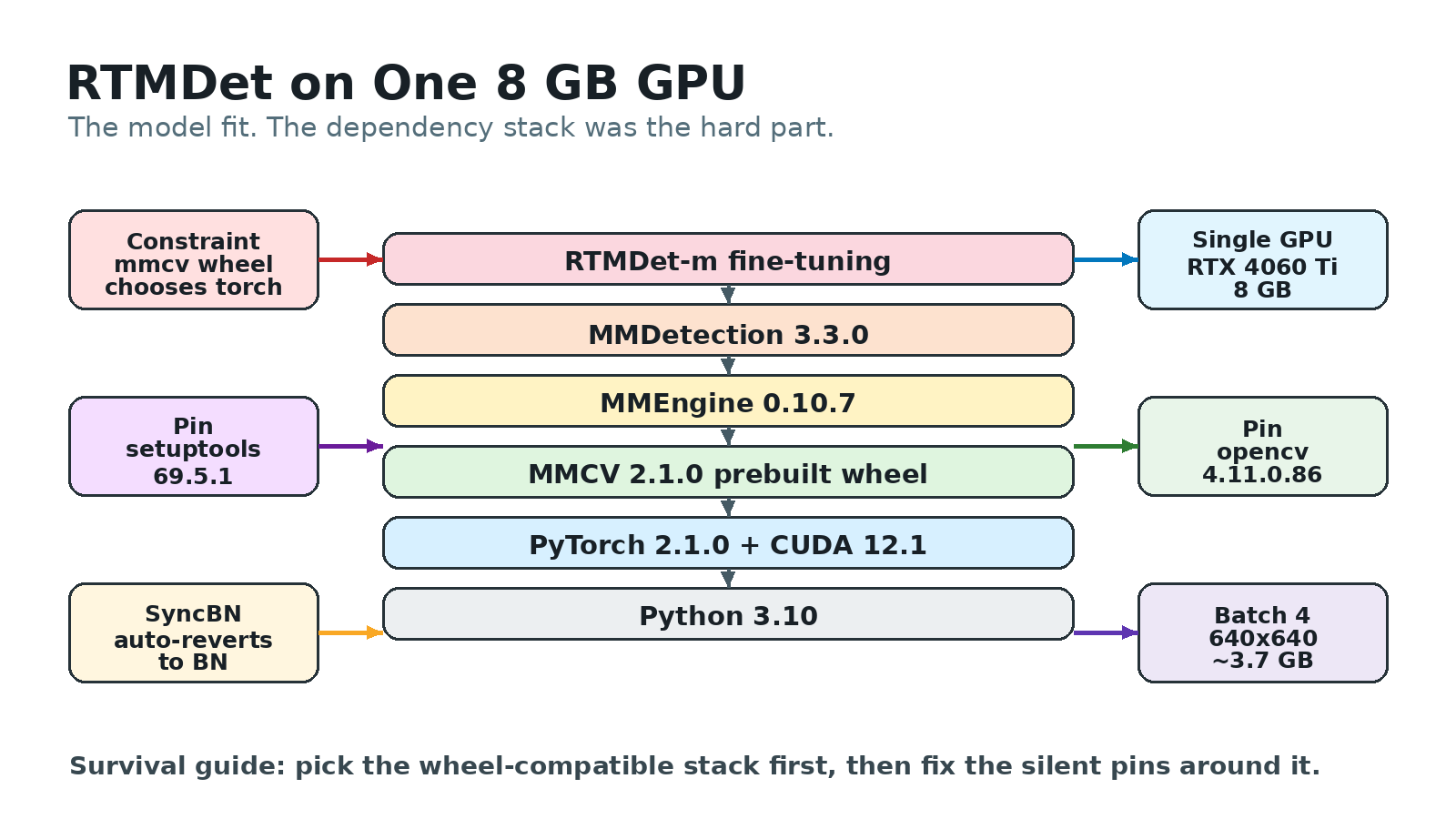 RTMDet-m itself fit comfortably on an 8 GB card. The brittle part was choosing a wheel-compatible PyTorch/MMCV/MMDetection stack and pinning the packages around it.
Problem 1: mmcv has no prebuilt wheel for your PyTorch version
Symptom
- Expected:
pip install mmcv==2.1.0drops in a prebuilt binary, like any wheel. - Actual: With a recent PyTorch (e.g. 2.5.x), pip finds no matching wheel and falls back to building mmcv from source — which needs a full CUDA toolkit (
nvcc), takes many minutes, and frequently fails on a mismatched toolkit. - Reproduction: Create an env with a newer torch (e.g. 2.5.x), then
pip install mmcv==2.1.0.
Root Cause
mmcv’s compiled CUDA ops are distributed as prebuilt wheels indexed per exact (torch, cuda) pair, not as one universal wheel. The index is explicit in the URL:
1
https://download.openmmlab.com/mmcv/dist/cu121/torch2.1.0/index.html
There is a torch2.1.0 bucket for CUDA 12.1; as of mid-2026 there is no mmcv 2.1.0 wheel in the cu121 torch2.2–torch2.5 buckets. Ask pip for mmcv 2.1.0 on torch 2.5 and it has nothing to download, so it compiles — and a from-source build on a consumer box without a matched CUDA toolkit is exactly where setups die. The mmcv ceiling is itself fixed by mmdet: mmdet 3.3.0 requires mmcv<2.2.0, so mmcv 2.1.0 is the cap — and torch 2.1.0+cu121 is the newest torch with a prebuilt mmcv 2.1.0 wheel.
Solution
Pin to the combination that has a wheel. For mmcv 2.1.0, that sweet spot is torch 2.1.0 + cu121, installed from the matching indexes in order:
1
2
3
4
5
6
# 1) torch from the cu121 wheel index
pip install torch==2.1.0 torchvision==0.16.0 --index-url https://download.pytorch.org/whl/cu121
# 2) mmcv from the torch2.1.0/cu121 prebuilt index (NOT plain PyPI)
pip install mmcv==2.1.0 -f https://download.openmmlab.com/mmcv/dist/cu121/torch2.1.0/index.html
# 3) the rest
pip install mmdet==3.3.0 mmengine==0.10.7
The whole verified stack:
| Layer | Pin | Why this exact value |
|---|---|---|
| Python | 3.10 | has a prebuilt mmcv wheel (cp38–cp311 are published) |
| PyTorch | 2.1.0+cu121 | a prebuilt mmcv 2.1.0 wheel exists for it |
| mmcv | 2.1.0 | the compiled-ops layer |
| mmdet | 3.3.0 | ships RTMDet |
| numpy | 1.26.4 (<2) | see Problem 4 |
| setuptools | 69.5.1 | see Problem 2 |
Lesson: mmcv is the constraint, not PyTorch. Pick the newest torch with an mmcv prebuilt wheel within your mmdet’s mmcv cap, then pin backwards from there — chasing the latest torch buys you a source build, not speed.
Problem 2: ModuleNotFoundError: No module named 'pkg_resources'
Symptom
The stack installs, but the moment training starts up — mmengine logs the environment via collect_env, which imports torch.utils.cpp_extension — it dies:
1
ModuleNotFoundError: No module named 'pkg_resources'
Root Cause
pkg_resources used to ship inside setuptools. setuptools 82.0.0 (Feb 2026) removed it — it had only been deprecated (importable, with a warning) since 67.5.0 — and a fresh pip install today pulls a version past that line. But PyTorch 2.1.0’s torch.utils.cpp_extension still does import pkg_resources at import time. So a fresh env with a modern setuptools + old torch is a mismatch: torch expects a module its toolchain no longer bundles.
Solution
Pin setuptools back to a release that still includes pkg_resources:
1
2
- setuptools            # whatever pip resolves (too new → no pkg_resources)
+ setuptools==69.5.1    # still vendors pkg_resources for torch 2.1.0's cpp_extension
Lesson: setuptools is a silent build-time dependency of old PyTorch. When a pinned-old torch throws ModuleNotFoundError: pkg_resources, the culprit is a too-new setuptools, not your code.
Problem 3: the SyncBN “single-GPU crash” mmengine quietly prevents
This one earns a slot precisely because many older guides and forum answers claim it’s a single-GPU blocker — and on a modern stack it isn’t.
Symptom
- Expected: RTMDet’s base configs use
SyncBN, which is built for multi-GPU. Plenty of guides say a single-GPU run will crash unless you overridenorm_cfgto plainBN, so I braced for atorch.distributed“process group not initialized” error. - Actual: It just trained. At startup mmengine logged (reproduced exactly):
1
2
mmengine - INFO - Distributed training is not used, all SyncBatchNorm (SyncBN)
layers in the model will be automatically reverted to BatchNormXd layers if they are used.
Root Cause
The base config really does use SyncBN — in configs/rtmdet/rtmdet_l_8xb32-300e_coco.py (which the m config inherits via _base_), backbone, neck, and bbox_head all set norm_cfg=dict(type='SyncBN'). But mmengine detects a non-distributed run and reverts every SyncBN to BatchNormXd for you (via mmengine.model.revert_sync_batchnorm) — I never had to rely on raw torch behavior, because mmengine reverted it first. So the crash this advice warns about never fires on this stack.
Verified on mmengine 0.10.7 + torch 2.1.0 by training a
SyncBN-forced config on one GPU: it reverted and ran. Older stacks may behave differently — check your startup log.
Solution
You can set norm_cfg=dict(type='BN') explicitly (this project does, and it makes the single-GPU intent obvious), but on modern mmengine it is optional, not a crash fix:
1
2
3
4
5
6
# configs/helmet_hook/rtmdet_m_helmet_hook.py — explicit, though mmengine would revert SyncBN anyway
model = dict(
    backbone=dict(norm_cfg=dict(type='BN')),
    neck=dict(norm_cfg=dict(type='BN')),
    bbox_head=dict(num_classes=4, norm_cfg=dict(type='BN')),
)
Lesson: Don’t cargo-cult the “override SyncBN→BN or it crashes” advice. Read the startup log first — mmengine reverts SyncBN on non-distributed runs, so the override is for clarity, not survival.
Problem 4: pip install fails with ResolutionImpossible (opencv vs numpy)
Symptom
Installing the requirements aborts before anything downloads (reproduced exactly):
1
2
3
4
5
6
ERROR: Cannot install numpy==1.26.4 and opencv-python==4.13.0.92 because
these package versions have conflicting dependencies.
The conflict is caused by:
    opencv-python 4.13.0.92 depends on numpy>=2; python_version >= "3.9"
ERROR: ResolutionImpossible: for help visit
https://pip.pypa.io/en/latest/topics/dependency-resolution/#dealing-with-dependency-conflicts
Root Cause
This project’s stack pins numpy==1.26.4 (i.e. < 2, which the pinned mmcv/mmdet need here). But recent opencv-python declares a hard floor of numpy >= 2 on Python 3.9+. You can confirm it straight from the package metadata:
1
opencv-python 4.13.0.92  →  requires  numpy>=2; python_version >= "3.9"
Two pins that must coexist now demand opposite numpy majors, so pip’s resolver gives up. Note this is a resolver-time wall, not a runtime one: once installed (resolver bypassed, e.g. --no-deps), cv2 4.13 and numpy 1.26.4 run together fine — my live env does — but a clean pip install never gets that far (and pip check keeps flagging the conflict).
Solution
Pin opencv-python to a release that predates the numpy >= 2 floor:
1
2
- opencv-python==4.13.0.92   # requires numpy>=2 → conflicts with numpy<2
+ opencv-python==4.11.0.86   # predates the numpy>=2 floor; works with numpy 1.26.4
(Alternatively, install opencv with --no-deps after numpy is already in place — but a clean pin is less fragile.)
Lesson: A ResolutionImpossible is a metadata conflict, not always a real incompatibility. Read the “conflict is caused by” line, find the package with the offending floor/ceiling, and pin it to a version whose metadata agrees with your locked dependency.
Smaller traps (quick hits)
- Scale
base_lrto your batch — the silent one. RTMDet’s base configs setbase_lr=0.004for a global batch of 256 (8 GPUs × 32). On one GPU at batch 4 that rate is far too hot — training diverges or just learns poorly, with no error to tip you off. Strict linear scaling would put it near6.25e-5(0.004 × 4/256); this project instead used a tunedbase_lr=4e-4— above the linear rule but still ~10× below the base, and stable at batch 4 — plus a lowernum_workersfor a consumer box. It’s the one gotcha here that fails silently. ModuleNotFoundError: No module named 'seaborn'when plotting curves.tools/analysis_tools/analyze_logs.pydoesimport seaborn as snsat the top, so loss-curve plotting needs it even though training doesn’t. Fix:pip install seaborn(keep it inrequirements.txt).analyze_logs.py ... KeyError: 'bbox_mAP'when plotting the mAP curve. The mAP scalar is only logged on validation epochs, so the plot needs the eval interval, and you pass the bare key —bbox_mAP, not thecoco/bbox_mAPthat checkpointing uses:plot_curve <run>/<timestamp>/vis_data/scalars.json --keys bbox_mAP --eval-interval 2(match yourval_interval). (TensorBoard is the easier route for the mAP curve.)- In the VSCode integrated terminal,
conda activate rtmdetworks butpythonruns the wrong interpreter. VSCode injects its selected-interpreter path (apkgs/python-3.13...cache) at the front ofPATH, sopythonresolves there instead of the env. It’s a PATH issue, not a broken env. Fix: pick thertmdetinterpreter in Python: Select Interpreter, or just call the env python directly —~/miniconda3/envs/rtmdet/bin/pythonorconda run -n rtmdet python.
What 8 GB actually buys you
Once it runs, 8 GB is more than enough for RTMDet-m fine-tuning at 640×640, batch ≤ 4 (the regime here):
| Setting | VRAM | Note |
|---|---|---|
| RTMDet-m, batch 2, 640×640 | ~2.1 GB | smoke test |
| RTMDet-m, batch 4, 640×640 | ~3.7 GB | the comfortable default |
The non-obvious trap is trying to use the headroom for a second job. Running two trainings on the same 8 GB card tipped it into VRAM spill, and throughput collapsed from ~0.17 s/iter to as bad as ~20 s/iter — roughly 100× slower, far worse than just running them back to back.
Lesson: On a tight single GPU, “I have spare memory, I’ll run two” is a trap. Once allocations spill, both jobs thrash; run them sequentially.
Conclusion
Key Takeaways:
mmcvdictates the stack. Pick the newest torch with a prebuiltmmcvwheel (torch 2.1.0 + cu121formmcv 2.1.0) and install mmcv from the OpenMMLab index, not PyPI.- Old torch needs old-ish
setuptools.pkg_resourcesmissing → pinsetuptools==69.5.1. SyncBNon one GPU is a non-issue on modern mmengine — it auto-reverts toBN. An explicit override is for clarity, not a crash fix; read the startup log before “fixing” it.ResolutionImpossibleis a metadata fight. Read the conflict line and pin the offender (opencv-python==4.11.0.86againstnumpy<2).- Don’t parallelize on one tight GPU. Spilled VRAM thrashes; run jobs sequentially.
Resources
- OpenMMLab MMDetection · MMCV prebuilt-wheel index (cu121 / torch2.1.0)
- pip — dealing with dependency conflicts
- Version-fact sources: setuptools changelog (
pkg_resourcesremoved in 82.0.0) · opencv-python on PyPI (thenumpy>=2floor) - Companion posts: the RTMDet model this stack trained · RTMDet paper review